

Quarantine tests
Quarantine lets you keep selected tests running while you investigate a known failure or flaky test. When a quarantined test fails, the suite does not fail. Quarantined tests run once without retries. Endform still records their actual results and metrics.
Use a quarantine rule when you want to keep collecting evidence while allowing the rest of your suite to determine whether CI passes. Tests still execute and use runner time.
To find and fix the cause of a flaky test, see our guide to Playwright flaky tests.
Create a quarantine rule
Section titled “Create a quarantine rule”Run your suite in Endform first so you can select it in the dashboard.
- Open your organization’s Quarantine tab.
- Select Add quarantine rule and choose a Suite.
- Fill in at least one matching field:
- Test: Search for and select a test, or paste its test ID.
- Playwright project: Match a project such as
chromium. - Branch: Match a branch such as
main.
- Select Preview matches to check the scope.
- Under Reason & expiry, optionally add context for your team and an expiry date. The expiry input uses your local time.
- Select Create rule. The rule applies to matching tests in new suite runs.
All filled-in fields must match exactly. Empty fields match any value within the selected suite. For example, selecting only a branch quarantines every test in that suite on that branch. Add a test or project condition when you need a narrower rule.
The preview uses the latest completed run for the selected suite and branch. It counts each matching test once across projects and does not consider other quarantine rules. Future runs may contain different tests, so the preview is a guide to the rule’s scope.
Manage rules from the CLI or AI
Section titled “Manage rules from the CLI or AI”Use endform samples to find the exact persisted suite and test IDs, then use
them to create a rule:
npx endform@latest samples test-runs --where 'testRun.outcome = fail' --limit 10npx endform@latest quarantine create \ --suite-id suite_123 \ --test-id test_456 \ --reason 'Investigating checkout failures' \ --ends-at 2026-09-23T12:00:00ZCreation requires --suite-id and at least one of --test-id, --project, or
--branch. List active rules, include inactive rules, or deactivate a rule by
its exact ID:
npx endform@latest quarantine listnpx endform@latest quarantine list --allnpx endform@latest quarantine deactivate rule_789An AI coding agent can follow the same sample-driven workflow through the Modify quarantine rules with AI guide.
Example: quarantine a failing Firefox test
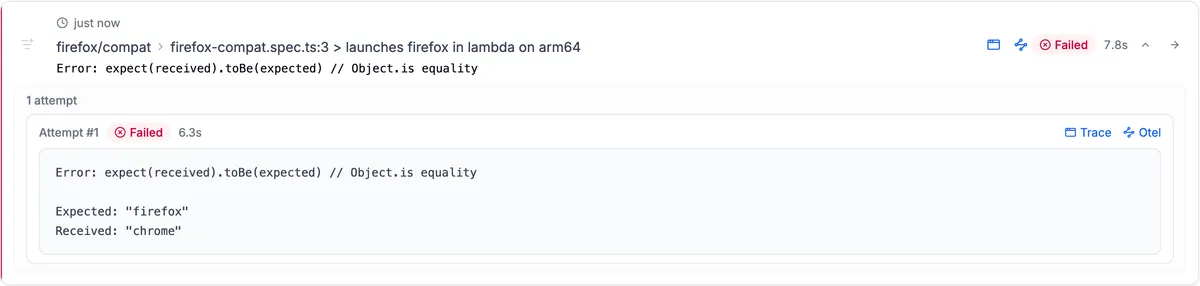
Section titled “Example: quarantine a failing Firefox test”This test, launches firefox in lambda on arm64, fails because its assertion
expects firefox but receives chrome. Before quarantine, the dashboard shows
the failed result and the assertion error.
To keep this test running while investigating, select the endform · e2e suite
and the test in Add quarantine rule. In this example, Playwright project
and Branch are empty, so the rule matches this test across all projects and
branches in the selected suite.
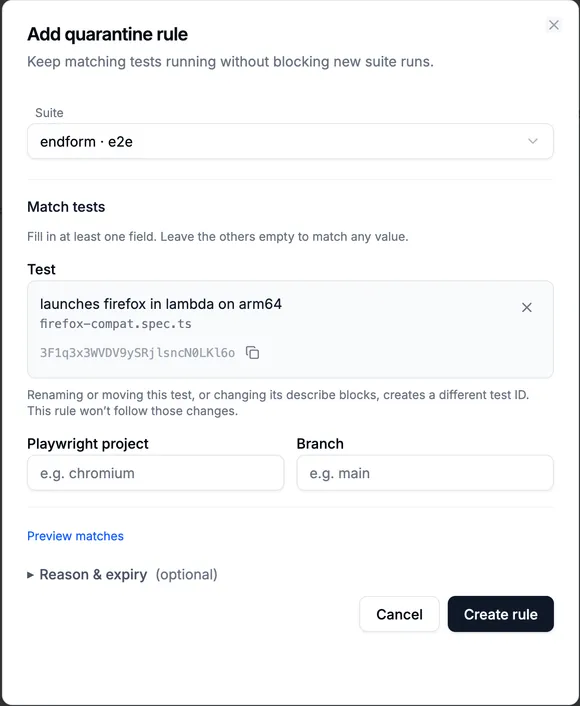
Select the test, preview the matches, and choose Create rule. Reason and expiry are optional.
The selected test is matched by its ID. Renaming or moving it, or changing its describe blocks, creates a different test ID that this rule will not match.
On a new run, the test still executes with its configured retries. If it fails after exhausting retries, the suite can still pass when the other tests pass and there are no blocking errors.
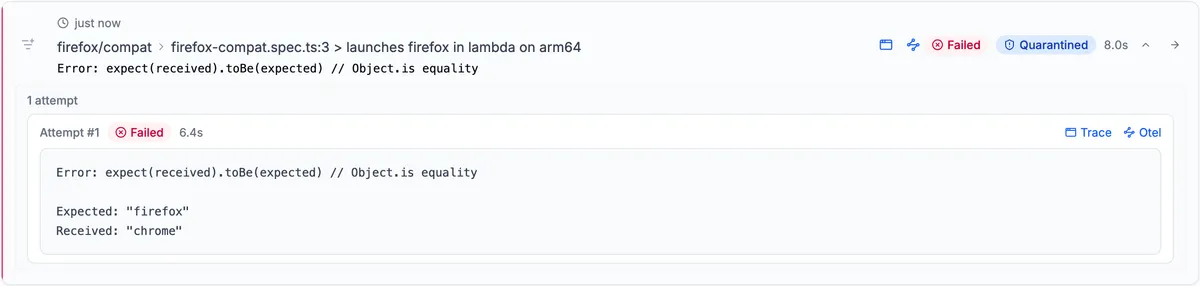
After quarantine: the test still shows Failed, alongside a Quarantined badge. Its error and trace links remain available.
Select the Quarantined badge to see the rule that applied. The CLI also marks the test as quarantined and includes quarantine counts in the summary.
The suite result shows the effect of the rule. The earlier run failed; the new run passes even though its one test still fails, because that test is now quarantined.

The newer suite run passes after quarantine. The earlier run keeps its failed outcome.
What quarantine changes
Section titled “What quarantine changes”Quarantine changes retry behavior and whether a test failure blocks the suite:
- Quarantined tests run once and are not retried, even when the project has retries configured. This applies to both immediate and isolated retry strategies. Tests outside quarantine keep their configured retries.
- Quarantined test failures do not count toward
maxFailures. - Actual test outcomes and metrics remain in Endform’s history, so you can see whether the test is recovering.
A passing suite can therefore contain failed quarantined tests. See Dashboard analytics for how to interpret those results.
Merged Playwright reports present quarantined attempts differently from Endform’s stored outcomes. If you use HTML, JUnit, or custom reporters, read Quarantined results in custom reporters.
Rule timing and overlapping rules
Section titled “Rule timing and overlapping rules”Endform determines which rule applies when a suite run starts. Creating, expiring, or deactivating a rule does not change an ongoing run or rewrite historical results.
When several active rules match a test, the oldest matching rule applies. After it expires or is deactivated, the next matching active rule can apply to future runs.
A rule without an expiry stays active until you deactivate it. Expired and deactivated rules remain visible for reference.
Remove or change quarantine
Section titled “Remove or change quarantine”Once you have fixed the test, inspect its recent outcomes and retries in the dashboard. To restore normal failure behavior, open the Quarantine tab and choose Deactivate rule from the rule’s actions menu.
Check for other matching active rules: deactivating one rule does not remove quarantine if another still matches. Start a new suite run to verify the test is no longer quarantined.
To change a rule’s conditions, reason, or expiry, deactivate it and create a replacement. Historical runs keep their association with the rule that originally applied.