

You push to CI. The test suite fails, then passes on the next run without any code changes. This pattern makes flaky Playwright tests costly.
A test that fails consistently demands attention and gets fixed. Intermittent failures get re-run, dismissed, and added to a backlog of issues nobody investigates. Over time, that backlog grows. The CI pipeline stops serving as a reliable signal and becomes a source of friction engineers learn to work around.
These failures rarely occur without a cause. Most flaky tests leave a recognizable signature: a timing gap, a shared-state leak, an environment mismatch, or an animation that blocks interaction at the wrong moment.
This article covers the four root causes behind most flaky Playwright failures in production CI environments, along with a five-step diagnostic workflow that identifies which one is responsible before any fix is attempted.
Why flaky tests are worse than failing tests
Test flakiness is one of the hardest problems to diagnose because it does not fail consistently. A consistently failing test in a Playwright suite points to a clear problem. When it fails reliably, the team knows where to look. A flaky test removes that signal, replacing a clear failure with uncertainty and gradually eroding trust in the test suite.
Once a team accepts that some test failures produce inconsistent results, the line between a real regression and a false positive begins to blur. Developers stop investigating every red build because too many have turned out to be false alarms, and real bugs make their way into production despite warning signs from the test suite. The CI/CD pipeline becomes a check engine light that flickers so often nobody pulls over.
Autonoma’s State of QA 2025 found that flakiness-related work in automated test suites consumes roughly 40% of QA team time. The Bitrise Mobile Insights 2025 found that teams experiencing flakiness rose from 10% to 26% between 2022 and 2025, across 10 million builds.
Teams that take this seriously treat every flaky Playwright test as a logged defect with an owner and a deadline. That discipline prevents backlog buildup and helps preserve trust in the pipeline. For a deeper look at how Playwright setup decisions contribute to flakiness, this guide to common Playwright setup mistakes is worth reading before moving on. The next step is reading what a failing test is telling you.
How to read a flaky test failure (before you start fixing)
Most teams try to diagnose flaky Playwright tests by re-running them until the failure reappears, but this method does not explain the failure class and only delays investigation. The key is understanding the failure before attempting any fix.
The trace viewer is often the first tool to enable. For local debugging, set
trace: 'on' in playwright.config.ts to record a trace for every run. In CI,
the choice comes down to a tradeoff. trace: 'on-first-retry' only starts
tracing once a test is retried, so passing tests stay cheap, but the trace you
get is of the retry, not the original failure. That distinction matters for a
flaky test that might not fail the same way twice.
trace: 'retain-on-failure' traces every attempt and keeps the file only if the
test fails, guaranteeing a trace of the actual first failure at the cost of
tracing overhead on every run. Teams running without retries need
retain-on-failure regardless, since on-first-retry has no retry to attach
to.
// playwright.config.ts
import { defineConfig } from "@playwright/test";

export default defineConfig({
  use: {
    trace: "on", // for local debugging, use 'on-first-retry' or 'retain-on-failure' in CI
  },
});
In setups that use custom reporters, the full errors array on the onTestEnd
result is often more useful than the top-level error field. The top-level error
typically shows a generic timeout, while the errors array includes assertion
failures and unresolved network conditions that point closer to the actual
cause.
What matters most is the state of the DOM at the moment the test failed, since that snapshot shows what actually happened. Slow, resource-starved environments are a common source of outright timeouts. This guide to diagnosing slow Playwright tests breaks down where that slowness comes from. Once a trace is open, the failure can be attributed to one of four root causes, starting with timing mismatches.
Root cause 1: Timing mismatches and race conditions
Timing mismatches are the first source of flakiness most engineers encounter, where a test clicks a button and immediately moves to the next assertion while the application code is still updating. It lands on an intermediate state, fails, and then passes on retry, showing that the sequence is where the failure lives.
The waitForTimeout anti-pattern
The waitForTimeout() anti-pattern often appears as the first instinct. A fixed
pause is added to give the application time to catch up, but sleeping for an
arbitrary duration is brittle. It can be too short when the app is slow and
unnecessarily long when it is fast. The deeper problem is that it does not
verify application state at all. The test moves on based on time, not on what
the application has actually done. Playwright recommends avoiding fixed sleeps
like page.waitForTimeout() in favor of web-first assertions and actionability
checks.
// Before: fixed timeout paired with a non-retrying visibility check
await page.getByRole("button", { name: "Submit" }).click();
await page.waitForTimeout(3000);
expect(await page.getByText("Order confirmed").isVisible()).toBe(true);

// After: waits for actual application state
await page.getByRole("button", { name: "Submit" }).click();
await expect(page.getByText("Order confirmed")).toBeVisible();
What Playwright auto-wait actually covers
Playwright’s auto-wait handles actionability checks before every action, verifying that an element is visible, stable and enabled, and able to receive pointer events with no other element obscuring it. Overlay animations in mid-transition states, debounced input handlers, and SPA route transitions that continue updating the DOM after navigation resolves all fall outside what it covers.
Engineers who assume auto-wait covers those cases often write tests that pass in isolation and flake under real application behavior because those conditions fall outside what auto-wait was designed to handle.
Web-first assertions as the fix
expect(locator).toBeVisible() and expect(locator).toHaveText() include
built-in retry behavior that waitForTimeout() lacks. They evaluate the
expected condition continuously until it succeeds or the timeout expires. The
right assertion removes the need for fixed delays.
API-dependent race conditions
Not every state-changing request needs an explicit network wait. If a UI element
like “Order confirmed” only renders once the request resolves, await expect(page.getByText('Order confirmed')).toBeVisible() already handles it
correctly. The assertion keeps polling until the confirmation appears, however
long the request takes.
Registering waitForResponse() earns its place in two narrower cases: when a
request changes application state without producing any visible signal to assert
on, or when the UI can’t be trusted to reflect what actually happened, an
optimistic interface that shows success before the server confirms it, for
example. In both cases, asserting on the response directly is the only reliable
check.
const responsePromise = page.waitForResponse(
  (response) =>
    response.url().includes("/api/orders") &&
    response.request().method() === "POST",
);
await page.getByRole("button", { name: "Place order" }).click();
const response = await responsePromise;
expect(response.status()).toBe(201); // response.status() is synchronous, no await needed
await expect(page.getByText("Order confirmed")).toBeVisible();
Missing await on async Playwright calls
A missing await on a Playwright assertion skips the async wait and leaves the
Promise unresolved. The assertion may run later than expected or outside the
intended test flow. The result can be a test that passes unexpectedly or fails
in a way that obscures the real cause. The broken and corrected versions below
show the difference.
// Broken: test continues before the assertion completes
expect(page.getByRole("dialog")).toBeVisible(); // missing await

// Correct
await expect(page.getByRole("dialog")).toBeVisible();
These practices address many of the timing issues that make Playwright tests unreliable. When these fixes are in place and failures continue, test order and shared state are the next most common culprits to check.
Root cause 2: Test order dependencies and shared state
When test A fails and test B fails right after it, the instinct is to investigate both. In most cases, only one test has a problem. Test B failed because it ran against state that test A left behind. One missing isolation boundary caused both failures.
Parallel execution exposes the problem
Order dependencies that stay hidden during sequential local runs often surface when tests run in parallel. In a sequential run, any leftover state that test A creates outside the browser often has time to settle before test B starts. Parallel execution removes that buffer, so two tests can collide over the same external resource at once.
What Playwright isolates and what it does not
Playwright creates a fresh browser context for every test, covering cookies, localStorage, sessionStorage, and IndexedDB. Two parallel tests behave like separate incognito windows. What Playwright does not isolate is anything outside the browser, including database records, server-side session state, and file system artifacts.
A test that creates a database record without cleaning it up leaves that record for subsequent tests accessing the same data layer. When another test encounters it, the failure traces back to leftover state.
The fixes
beforeEach is the first line of defense. It runs before every test and
establishes a known clean state regardless of what the previous test did.
test.beforeEach(async ({ request }) => {
  // Reset server-side state via API before each test
  await request.delete("/api/test-data/reset");
});
API-level state setup removes the timing dependencies and failure points that UI
setup introduces before the test even starts. Setting state directly through the
API gives the test a stable baseline. For authentication
state, test.use({ storageState: 'playwright/.auth/user.json' }) loads a pre-authenticated session into the test
context, removing repeated login flows across the suite.
The failure signature
The diagnostic tell for this root cause is specific: the test passes in
isolation and fails when the full suite runs. Running the suspect test with
test.only makes this clear. If it passes with test.only but fails in the
full suite, a state dependency exists. --grep narrows execution to a subset
for the same purpose. Together they confirm the dependency before any fix is
written.
When isolation is correct and failures persist, the focus shifts beyond the browser. CI environment differences are often the next variable to consider.
Root cause 3: CI environment differences
A test suite that passes locally and fails in CI without a clear error points to
a test environment problem. Running PWDEBUG=1 opens the Playwright Inspector
for local debugging and helps reproduce the failure interactively before making
larger changes like Docker or configuration updates.
Headless rendering and shared resources
Headless mode and headed mode use different browser binaries by default in current Playwright versions. Playwright’s browser documentation confirms it; Chrome for headed, chrome-headless-shell for headless. That’s exactly why rendering characteristics can differ, particularly around font rendering, viewport behavior, and GPU handling in CI environments. Layout-dependent locators that work in headed mode can miss elements in headless mode because the page is rendered differently. In many cases, the locator is fine; the test assumed an environment it was not running in.
Shared CI runners compound the problem. CI environments are often more resource-constrained than developer machines, and Playwright’s own CI guidance reflects this. It recommends starting with a single worker to prioritize stability and reproducibility. Under parallel load, those constraints can introduce timing failures and resource contention that become easier to reproduce when local resources are adjusted to match CI conditions.
Network variability
External dependencies like APIs, CDNs, and auth providers introduce latency that localhost testing does not expose, and that latency is a common source of flakiness unrelated to the code under test. Playwright’s own guidance is to mock services you don’t control rather than test against them directly, since their uptime and response time aren’t things a test can guarantee.
That default trades some real-world coverage for reliability, so most teams keep a small, separate set of tests running against the real service to confirm the integration still works, while the rest of the suite fakes the response for speed. Applying retry logic at the HTTP level covers whatever still has to stay real.
The Docker fix
Playwright’s official Docker image provides consistent browser binaries, system fonts, and OS dependencies across every machine that runs the tests. That consistency helps eliminate many environment-related failures. Docker does add complexity to local development workflows and setup requirements, so teams should weigh those costs before adopting it.
Conservative parallelism
Starting with workers: 1 in CI removes parallelism as a factor in test
execution. When a test still fails with a single worker, cross-test parallelism
can be ruled out and attention can shift to state, timing, or environment
differences next. Once the suite is stable, increase workers incrementally. The
config below shows this setup with the diagnostic worker setting in place, along
with a screenshot and video captured on failure so there’s evidence from the
single-worker run to compare against later.
import { defineConfig } from "@playwright/test";

export default defineConfig({
  workers: process.env.CI ? 1 : undefined, // diagnostic starting point, increase incrementally once stable
  use: {
    headless: true,
    screenshot: "only-on-failure",
    video: "retain-on-failure",
  },
});
Headless layout and browser isolation
Some failures only appear in a specific browser or rendering mode, making them
difficult to diagnose when multiple browser targets are running in the same
suite. The --project=chromium flag narrows execution to a single target,
removing cross-browser variation while troubleshooting before expanding scope.
Once the environment is consistent between local and CI, a different class of failure becomes easier to spot. A modal or mid-animation element may be blocking the interaction when Playwright attempts to act.
Root cause 4: Animation and overlay interference
Playwright’s actionability checks confirm an element is visible, stable, and ready to receive pointer events before a click occurs. The check passes, the action runs, and the test still fails. That sequence defines animation and overlay interference: the check happens at a specific moment while the application continues changing in the background.
Animation interference
An element becomes visible while its entry animation is still running. Playwright’s stability check passes because the bounding box is stable, but the element cannot reliably receive pointer events until the transition settles. What Playwright calls ready and what the application considers ready are two different moments.
Modals and overlays
Overlay interference follows a different path. An overlay or loading state can appear after Playwright marks a target as actionable but before the click lands. In SPAs, these states can result from application updates that occur without a page reload, making them difficult to detect through navigation events alone. The interaction hits an obscured element and appears random in the test output.
The fixes
When the trace shows an overlay blocking the target, locator.waitFor({ state: 'hidden' }) pauses execution until the element disappears.
// Wait for overlay to disappear before clicking the target
await page.locator(".loading-overlay").waitFor({ state: "hidden" });
await page.getByRole("button", { name: "Confirm" }).click();
For animation interference, the fix is disabling animations in the test
environment. Set reducedMotion: 'reduce' in playwright.config.ts to apply the
prefers-reduced-motion media feature across all test contexts. For a narrower
workaround, inject CSS with page.addStyleTag() to set animation-duration: 0ms
and transition-duration: 0ms. Note that addStyleTag applies to the current
page only and does not survive navigation, so a test that navigates afterward
must inject it again. Both options remove animation timing as a variable, at
different scopes.
import { defineConfig } from "@playwright/test";

export default defineConfig({
  use: {
    reducedMotion: "reduce",
  },
});
// Narrower workaround: disable animations via CSS for this test only
await page.addStyleTag({
content: `
*, *::before, *::after {
animation-duration: 0ms !important;
transition-duration: 0ms !important;
}
`,
});When the root cause is unclear, engineers often reach for force: true. It
overrides Playwright’s actionability checks, allowing the click to proceed even
when the element is obscured or mid-animation, and may skip verifying that the
element actually received the click event in the application. The test may pass,
but the result no longer reflects real user behavior. Teams using force: true
without understanding what it changes can end up with false confidence in their
test suites.
The failure signature
The diagnostic tell is an intermittent timeout on click, paired with an “intercepts pointer events” message in the trace, tied to animation timing or overlay state. Both failures share the same root cause: the application’s state changes after Playwright’s check completes, and visibility and readiness are distinct conditions that require waiting for the right state.
These failure signatures form a clear workflow for diagnosing flaky tests step by step.
How to debug a flaky test: A diagnosis workflow
The fastest way to waste time on a flaky test is to fix it before understanding why it failed. The five steps below provide a repeatable process for diagnosing the failure before deciding on a fix. For a visual walkthrough of the Playwright Trace Viewer before working through the steps, this official Playwright video covers the tool.
Step 1: Get a trace file
Every step after this one works from a trace, so the first job is producing one.
If a CI run already failed with on-first-retry or retain-on-failure
configured, per the tradeoff covered earlier, download that trace and open it at
trace.playwright.dev without installation. If no
CI trace exists yet, reproduce the failure locally:
npx playwright test --repeat-each=20 --trace=on --retries=0 --max-failures=1Retries are disabled so a flaky result cannot be silently retried into a pass, and the run stops at the first failure since a single trace is enough. Either path ends in the same place: a trace containing DOM snapshots, the network timeline, and the complete action sequence.
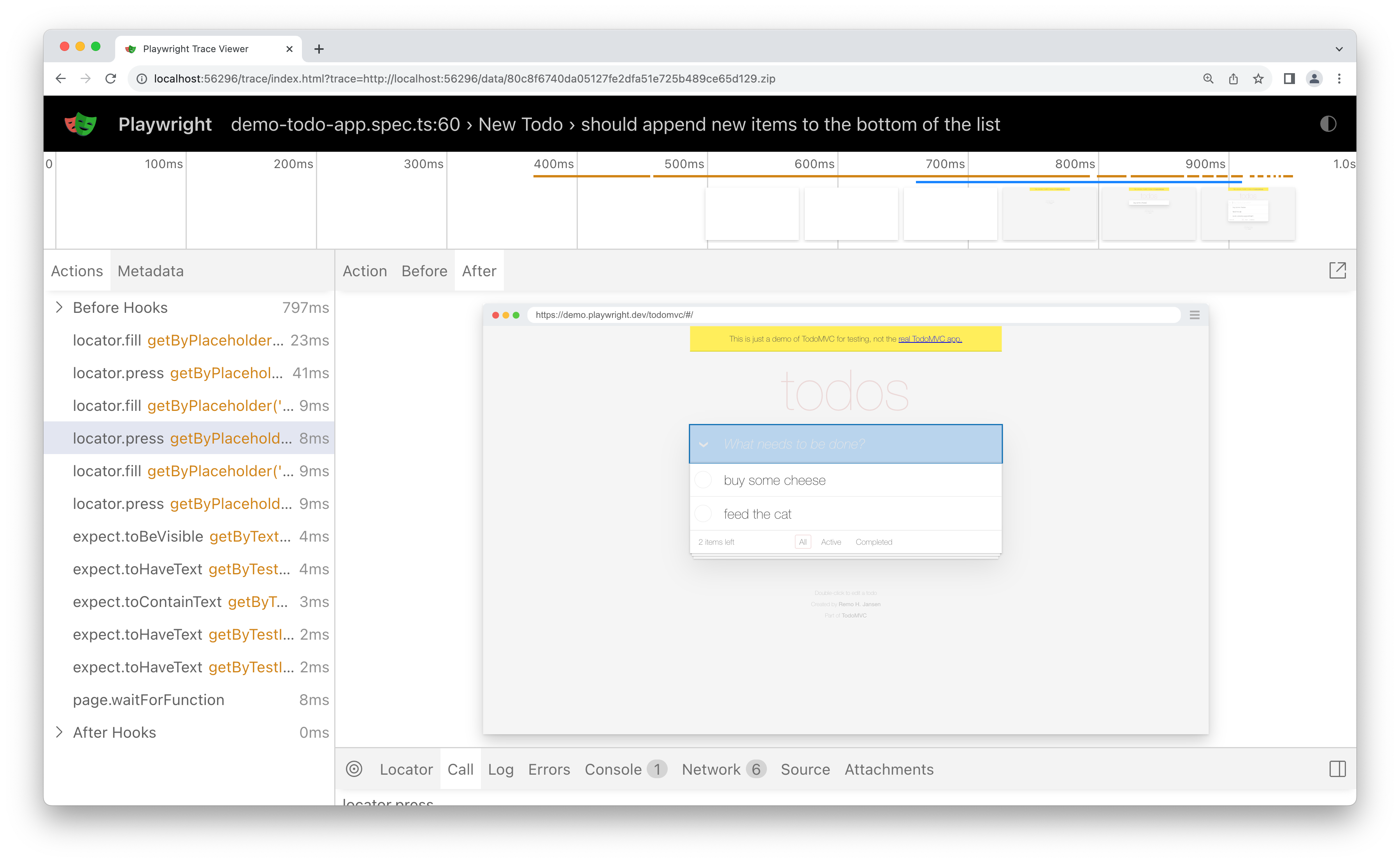
Step 2: Inspect the DOM snapshot at the moment of failure
The DOM snapshot at failure time gives a clearer picture than the error line. It shows what the application contained when the action executed. In the trace viewer, select the failed step in the timeline and inspect the DOM panel for the target element, its expected text or state, and any visible overlays.
Step 3: Check the network timeline
The network timeline complements the DOM snapshot. Look for API calls that never resolved, responses that arrived later than expected, or requests that never fired. These findings often point to race conditions or state dependencies.
Step 4: Classify the failure
Using the DOM snapshot and network timeline, place the failure into one of the four root causes covered in this article: timing mismatch or race condition, test order dependency or shared state, CI environment difference, or animation and overlay interference. If more than one category applies, address each contributing cause.
Step 5: Apply the fix and confirm
Apply the fix associated with the identified root cause and re-run the test with
--repeat-each=20 --retries=0. Twenty consecutive passing runs provide
confidence that the issue has been resolved. Most flaky Playwright tests can be
diagnosed with this same five-step workflow, which keeps the work manageable
even as test suites grow.
When a flaky test cannot be fixed immediately, the priority shifts from resolution to containment. The next section covers how to do that without affecting the rest of the suite.
Managing flaky tests you can’t fix immediately (quarantine pattern)
Flakiness is technical debt that compounds quickly, reducing CI confidence as the suite grows. Quarantine flaky tests to keep them visible, owned, and scheduled for resolution without letting them block the build.
The flaky tag pattern and two-job approach
Tag quarantined tests with @flaky and split the pipeline into two jobs. A
tagged test might look like test('checkout flow', { tag: '@flaky' }, async ({ page }) => { ... }). The main job runs with --grep-invert @flaky to exclude
them, while the quarantined job runs with --grep @flaky and
continue-on-error: true, keeping results visible without blocking the build.
This only holds if branch protection requires just the Main Suite job as the merge check, since GitHub Actions still marks the overall run as failed when the quarantined job fails.
name: Playwright
on:
  push:
  pull_request:
jobs:
  test:
    name: Main Suite
    runs-on: ubuntu-latest
    steps:
      - uses: actions/checkout@v7
      - uses: actions/setup-node@v7
        with:
          node-version: lts/*
      - run: npm ci
      - run: npx playwright install --with-deps
      - run: npx playwright test --grep-invert @flaky
  flaky-suite:
    name: Quarantined Tests
    runs-on: ubuntu-latest
    continue-on-error: true
    steps:
      - uses: actions/checkout@v7
      - uses: actions/setup-node@v7
        with:
          node-version: lts/*
      - run: npm ci
      - run: npx playwright install --with-deps
      - run: npx playwright test --grep @flaky
If your suite runs on Endform, quarantine rules do the same without tags or a second job. Quarantined tests still run and report, but their failures don’t fail the suite.
Owner, ticket, and deadline
Quarantine tends to break down without clear ownership and follow-up on every test. Give each entry a named owner, a ticket with reproduction steps and failure classification, and a deadline, so the quarantine doesn’t quietly become permanent.
Retries as a safety net
Retries deserve a place here, but only as a stopgap, not a fix. A test that passes on a second try is still reporting a real problem. Retrying keeps the failure from interrupting the build, while the underlying issue remains unresolved. Used sparingly and alongside quarantine rather than in place of it, retries buy time while the root cause is being investigated.
Playwright’s built-in retries run sequentially: a failed test is retried once, and only if that attempt fails does the runner try again. Each retry waits for the previous attempt to complete before starting. Endform runs retries in parallel instead, so if the first attempt fails, every retry kicks off at once rather than queuing one after another.
Tracking flakiness metrics
Flaky test detection starts with tracking individual failures per run and reviewing trends over time to see whether a test is stabilizing or getting worse. That view helps prioritization before issues build up. Tests that fail across multiple test runs in CI without any code changes should be treated as defects immediately.
The cultural fix
Teams that actively reduce flaky tests treat every confirmed failure as a P2 defect to be resolved before the next sprint. Quarantine reinforces that discipline by turning intent into a visible, time-bound commitment. For teams that need cross-run visibility into instability, Endform reveals CI trends so recurring failures can be identified and prioritized.
Quarantine without ownership is just a label. A stable suite depends on treating quarantine as a temporary state with clear accountability and a resolution date. That discipline extends into how tests are written, where stability comes from decisions made before a test runs.
Flakiness prevention: Writing tests that stay stable
This section covers the conventions that prevent flaky tests before they appear, limiting the need for later correction.
Resilient locators from the start
Many flaky tests trace back to locator choice. A clear hierarchy reduces that
risk: user-facing attributes such as role, label, placeholder, and visible text
come first, followed by data-testid, with CSS selectors based on structure or
position used only when no semantic option exists. Locators tied to user-visible
intent remain stable as the interface changes.
Treating waitForTimeout as a banned pattern
Treat waitForTimeout as banned in code review. Allowing it even as a
“discouraged” practice introduces inconsistency, and it tends to slip into tests
over time. A ban removes that uncertainty and keeps it out of the codebase.
State setup and Playwright fixtures
Each test sets up its own state without relying on previous executions. Playwright fixtures enforce this isolation by default, providing a fresh initialization per test and removing any dependency on execution order.
Page object model with built-in wait handling
The page object model centralizes timing-sensitive logic and locators alike, keeping both out of test files and reducing duplication across test files. The example below shows how this works inside a page object method, with locators defined once as properties and the action and the assertion kept separate so the page object stays reusable across different test scenarios.
// pages/CheckoutPage.ts
import { Page, Locator } from "@playwright/test";

export class CheckoutPage {
  readonly page: Page;
  readonly placeOrderButton: Locator;
  readonly orderConfirmationToast: Locator;

  constructor(page: Page) {
    this.page = page;
    this.placeOrderButton = page.getByRole("button", { name: "Place order" });
    this.orderConfirmationToast = page.getByText("Order confirmed");
  }

  async submitOrder() {
    const responsePromise = this.page.waitForResponse(
      (response) =>
        response.url().includes("/api/orders") &&
        response.request().method() === "POST",
    );
    await this.placeOrderButton.click();
    await responsePromise;
  }
}
The method handles the click and the network wait, the two things that make this action prone to timing issues, but leaves verification to the test itself:
// tests/checkout.spec.ts
await checkoutPage.submitOrder();
await expect(checkoutPage.orderConfirmationToast).toBeVisible();
This split keeps the page object focused on what the page contains and what
happens on it, locators and actions both, while the test retains control over
what counts as success. submitOrder() stays reusable across scenarios without
dragging a fixed assertion along with it. Since checkoutPage exposes the
confirmation by name, the test also never needs to know the raw selector behind
“Order confirmed.”
The burn-in pattern
Burn-in testing means running a new test many times before it merges to catch
intermittent failures before CI does. Using --repeat-each=10 in PR checks for
high-risk flows exposes issues that only appear under load or variable timing.
The command below targets changed files, keeping execution fast:
npx playwright test --only-changed=main --retries=0 --repeat-each=10Code review checklist
These are some of the things worth looking for in a review before a test merges:
-
Locators follow the established hierarchy (role → label → placeholder → text →
data-testid). -
waitForTimeoutis not present in the diff. -
Each test manages its own state.
-
Fixtures handle initialization.
-
Wait logic is contained within page objects.
-
High-risk changes have passed a
--repeat-each=10run.
Consistent code review keeps these checks effective and prevents flaky practices from finding their way back into the suite.
Wrapping up
Most flaky Playwright tests leave a signature. The challenge is identifying the failure class and tracing it back to the underlying cause.
Timing mismatches, state dependencies, environment differences, and animation and overlay interference each have their own fix. The approach to diagnosing them stays the same. A structured process makes failures easier to classify and resolve, while quarantine and prevention keep the suite stable.
For teams that need cross-run visibility into recurring failures, Endform reveals error trends for Playwright suites without requiring a custom reporting solution. The broader habit, tracing every failure back to its root cause before attempting a fix, applies to any suite an engineer maintains, regardless of framework.