

Proxy traffic via your local network
Servers that you want to test against that are either running locally or within a private network are not automatically exposed to the internet. These servers are not reachable by default from the remotely running Playwright instances. Trying to reach them without this extra setup would likely result in connection errors in your tests.
When this happens, we need a method of shuttling traffic between the remote runners and the servers running on your local network.
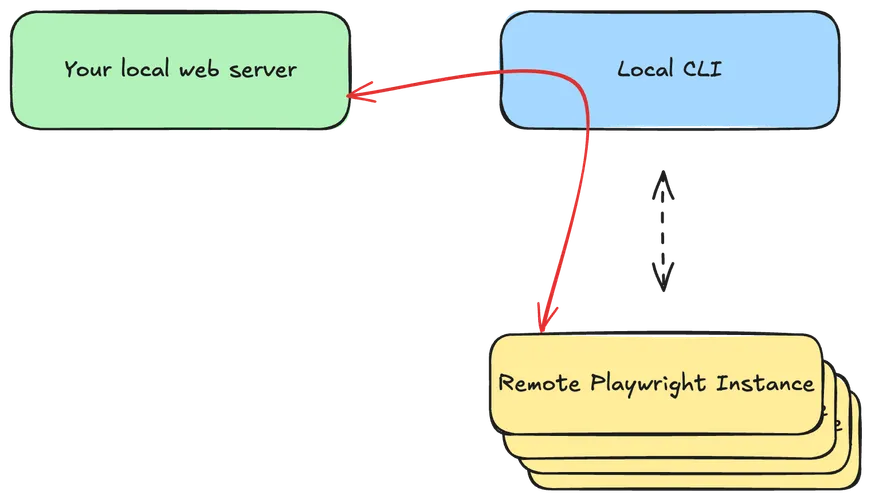
Endform has the ability to connect the remote Playwright runners to the servers on your local network via direct, hole-punched, encrypted, peer-to-peer connections. We can do this by utilizing the iroh network.
Setting up Endform to proxy traffic
Section titled “Setting up Endform to proxy traffic”-
Configure which traffic to proxy.
Section titled “Configure which traffic to proxy.”As a Playwright
Section titled “As a Playwright webServer”webServerIf you want to run your local server as a Playwright
webServerthen you’re done! Leave your web server configuration as is, and we will automatically proxy the traffic to your local server.With your own custom server
Section titled “With your own custom server”If you’re running a server outside of Playwright, that’s fine. You can tell Endform which traffic to proxy by using an
endform.config.tsfile.Use
proxyNetworkHostsfor most local web servers and APIs. This is the easiest option and uses HTTP interception in Node and in the browser.endform.config.ts import { defineEndformConfig } from "endform";export default defineEndformConfig({proxyNetworkHosts: ["<loopback>", "*.my-special-domain.com"],});If you need raw TCP connections to a local loopback port, use
proxyNetworkPortsinstead. Useful for things like database connections.endform.config.ts import { defineEndformConfig } from "endform";export default defineEndformConfig({proxyNetworkPorts: [5432, 6379],});You can configure both at the same time if needed. You can read more about
proxyNetworkHostsandproxyNetworkPortsin the endform config reference. -
Run your tests!
Section titled “Run your tests!”That’s it! You can now run your tests as normal, and the traffic will be proxied via the CLI to your target server.