

Dashboard analytics
Endform stores your suite results over time so you can understand more than the outcome of the latest run.
The analytics dashboard helps you answer questions like:
- Which tests fail most often?
- Which tests are flaky and only pass after retries?
- Which tests are slow enough to affect feedback time?
- Did failures start on a specific branch or commit?
- What happened inside a failed test attempt?
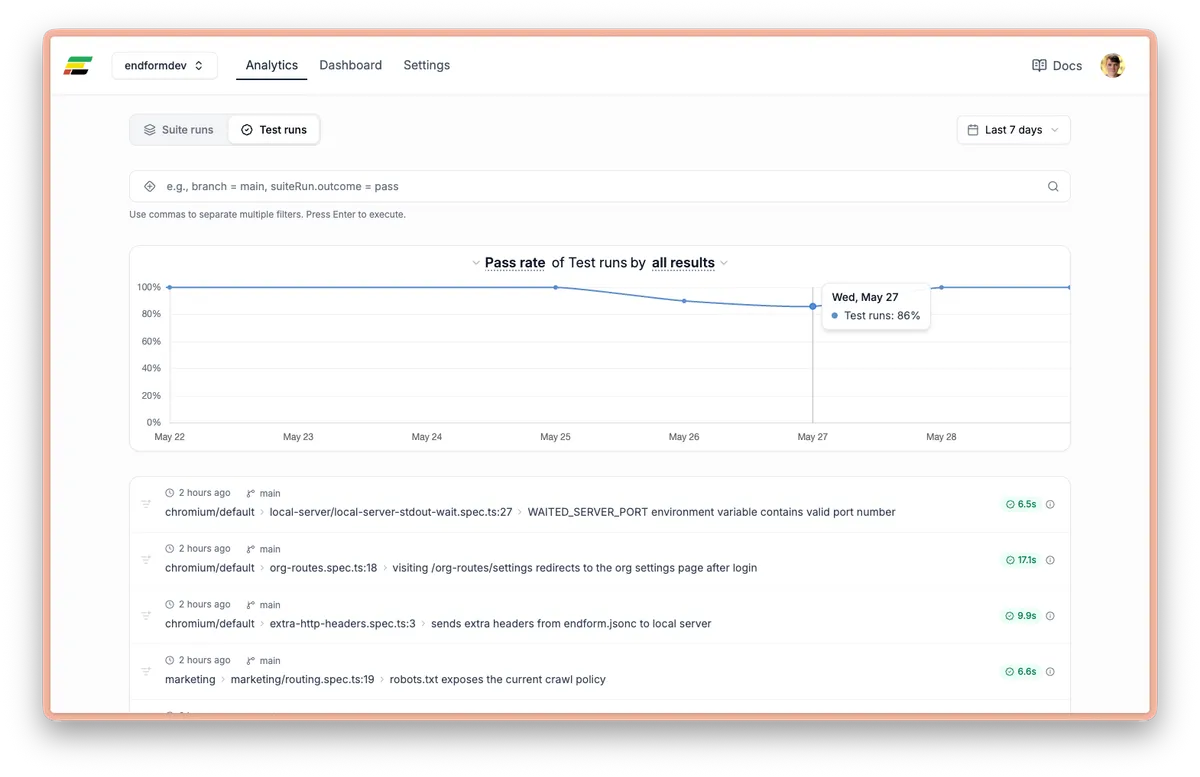
Suite runs and test runs
Section titled “Suite runs and test runs”Endform analytics has two main levels of data.
Suite runs describe one Endform run of a Playwright suite. Use suite runs to understand overall pass rate, suite duration, branch behavior, and CI health.
Test runs describe individual Playwright tests within suite runs. Use test runs to debug specific failures, retries, flaky tests, slow tests, and project-specific behavior.
Common metrics
Section titled “Common metrics”The dashboard can show metrics such as:
- Run count
- Suite duration
- Suite pass rate
- Test pass rate
- Test duration
- Number of attempts per test run
These metrics are most useful when grouped or filtered by branch, outcome, test name, or Playwright project.
Filters
Section titled “Filters”Use filters to narrow the dashboard to the part of the suite you care about.
Useful suite-level filters include:
branchcommitShasuite.repositorysuite.directorysuiteRun.outcomesuiteRun.durationSeconds
Useful test-level filters include:
test.nametest.locationtest.describestestRun.outcometestRun.projectNametestRun.testAttemptsCounttestRun.durationSecondstestAttempt.errorMessagetestAttempt.errorLocation
Find flaky tests
Section titled “Find flaky tests”A common signal for flakiness is a test run that eventually passed but needed more than one attempt.
Use a test runs view with filters like:
testRun.outcome = pass, testRun.testAttemptsCount > 1This shows tests that consumed retries. These tests may not fail the suite, but they still slow down feedback and reduce trust in the test suite.
Find slow tests
Section titled “Find slow tests”Use duration filters to find tests that dominate suite time:
testRun.durationSeconds > 30Slow tests are especially important in Endform because a highly parallel suite is often bottlenecked by the slowest individual tests. Reducing the longest tests can improve total feedback time more than optimizing already-fast tests.
Debug failures
Section titled “Debug failures”Start from failing suite runs or failing test runs:
suiteRun.outcome = failtestRun.outcome = failFrom a failed test run, inspect the individual attempts. Attempts can include error messages, error locations, Playwright trace links, and OpenTelemetry trace links when available.
Quarantined test results
Section titled “Quarantined test results”A suite can pass even when it contains failed quarantined tests. Quarantine normally prevents those failures from failing the suite, while Endform preserves each test’s actual outcome, attempts, and metrics.
Quarantined tests have a Quarantined badge in test run tables and on the test run page. Select the badge to view the rule that applied to that run. The association remains visible after the rule expires or is deactivated.
For example, testRun.outcome = fail still includes quarantined failures. Quarantined tests run once without retries, so use their outcomes across subsequent suite runs to judge whether they have recovered; a passing suite alone does not show that a test is healthy.
See Quarantine tests to create, expire, or deactivate rules and understand which failures still block a suite.
Use branch and commit metadata
Section titled “Use branch and commit metadata”Endform associates runs with git metadata when possible. This lets you compare behavior across branches and commits.
If automatic git detection is not correct in your CI environment, use ENDFORM_GIT_BRANCH and ENDFORM_GIT_COMMIT_SHA to override the reported metadata. See Environment variables.
Query the same data outside the dashboard
Section titled “Query the same data outside the dashboard”Use the endform analytics and endform samples commands to query historical test data from a terminal, script, or CI job.
You can also connect the Endform MCP server to an AI coding agent and ask it to investigate your test history. See Investigate test history with AI for example conversations.