

There’s a good chance you’ve seen those demos where an AI generates a Playwright test from a prompt, attaches to a failing test in debug mode, inspects the page, and suggests a fix, all without being told exactly what to do.
If your team already has a Playwright suite, the practical question is where agents fit into the workflows you already trust. This article gives you a framework for deciding where autonomy can save time, which constraints to define, and how to introduce agents while preserving reliable test results.
What is agentic AI testing?
Agentic AI testing is an approach in which an AI agent makes decisions while a test or testing task is running. You give the agent a goal, access to the application, and any relevant constraints. The agent then works out which actions to take based on what it encounters.
The process follows a continuous loop:
-
Observe: Inspect the current page, available controls, and application state.
-
Decide: Choose the next action that moves the task closer to its goal.
-
Act: Click, type, navigate, inspect, or perform another browser action.
-
Evaluate: Check the result and decide whether to continue, recover, or stop.
Agentic testing can introduce runtime decision-making at different points in a workflow. You might use an agent to repair a single locator, handle a changing checkout step, or investigate page state after a failure. You can also use it to explore a feature or complete an entire user journey from a high-level goal.
The framework for introducing agents to your test suite
Let’s walk through the key decisions you need to make before introducing AI agents into your testing suite.
Workflow context
Before choosing an autonomy level, define what you need the workflow to accomplish and what constraints it must operate within. The same user journey can require a different level of autonomy depending on the goal.
For example, a checkout flow used to explore a new payment experience may benefit from an agent that can try different paths, handle unexpected screens, and report what it discovers. The same checkout flow running on every pull request needs a much tighter setup: stable test data, predictable execution, and failures that point to a specific product expectation.
Start by defining the outcome you need from the run:
-
Exploration: Find unexpected states in a new feature before you write tests.
-
Debugging: Investigate why a checkout or authentication flow started failing.
-
Test generation: Discover a workflow and turn it into reviewable Playwright code.
-
Regression: Confirm that a critical path still works after every change.
Then define the operating constraints, i.e., which environment the agent can access, what data it can create or modify, how often the workflow runs, and what evidence you need after execution. These decisions determine the level of autonomy that makes sense for the workflow.
Once the context is clear, choose the control surface through which the agent will perform browser actions.
Browser control surface
A browser control surface is the interface your agent uses to navigate, click, enter text, inspect the page, and perform other browser actions.
When choosing a control surface, you’re deciding how much capability to give your agent and how much control to keep in your tests. This choice affects how easily you can connect the agent to the browser, integrate it with your existing test logic, and provide the context it needs to complete a task. It also determines whether you work with low-level browser commands, code-based abstractions, or commands designed specifically for agents.
You have three common options:
| Option | Advantages | Trade-offs | Consider it when |
|---|---|---|---|
| Low-level protocol, such as CDP | Gives you granular access to browser internals and protocol features | Requires more integration work and knowledge of browser-level details | You are building custom browser tooling or need capabilities exposed close to the browser |
| Agent-oriented command interface, such as the Playwright CLI | Gives agents concise, discoverable commands and keeps tool overhead low | Provides a command-oriented workflow that you need to coordinate with your test code | You want a coding agent to explore, generate tests, or investigate failures efficiently |
| Programming API, such as the Playwright SDK | Gives you precise programmatic control, reusable helpers, fixtures, and assertions | Requires the agent or test author to create and maintain code | You want agentic steps to integrate closely with an existing Playwright suite |
You can also combine these options based on where you need agent capabilities. For example, you might keep most of your suite in the Playwright SDK and give a coding agent access to the Agent CLI when you need help exploring a workflow or diagnosing a failure.
Scope of autonomy
Once your agent can interact with the browser, you need to decide how much of the journey it should handle. You can give it responsibility for a single action or the entire workflow. Each decision you delegate gives the agent more ability to handle changing or unexpected states. However, it can also introduce more runtime variability, which can affect cost, speed, consistency, and failure analysis.
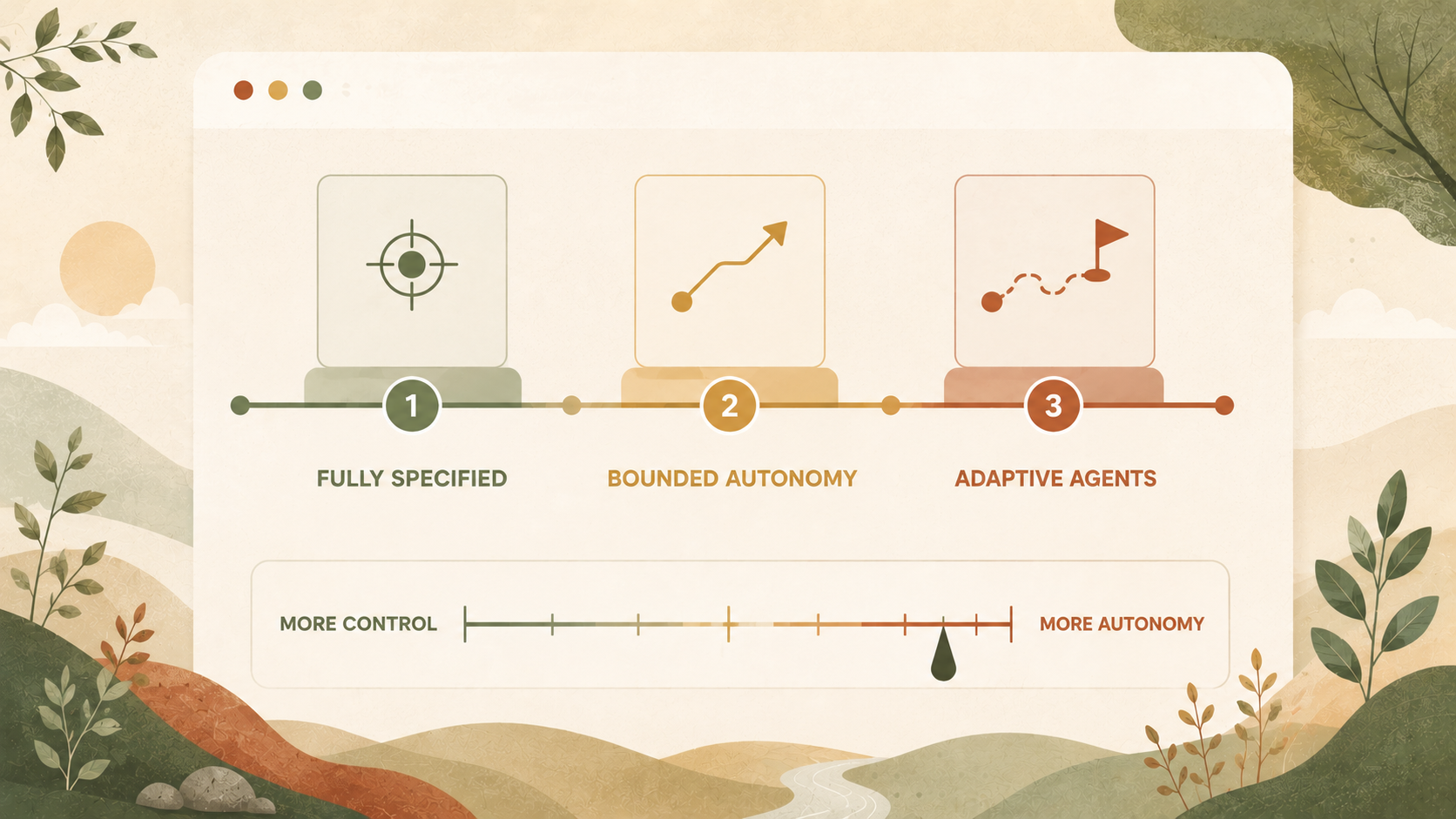
Your goal should be to give the agent enough autonomy to handle uncertainty while keeping repeatable parts of the workflow predictable. You can place each workflow at one of three points on the autonomy spectrum, as shown in the image below:

Fully specified
In fully specified execution, you define every action and assertion before the test runs:
await page.getByRole("button", { name: "Checkout" }).click();
await page.getByLabel("Card number").fill(cardNumber);
await expect(page.getByText("Payment successful")).toBeVisible();
The test follows the same instructions in the same order every time. If the application deviates from the expected path, it fails at the relevant step. This approach provides reviewable test code, repeatable execution, predictable cost, precise failure signals, and seamless integration with your existing version control and CI workflow.
The downside is that you need to define and maintain the entire path upfront. Changes to the interface, application state, or expected sequence may require updates to the test. Choose fully specified execution for critical product behavior, frequent CI checks, and scenarios where predictable speed, cost, repeatability, and precise failure signals matter most.
Bounded autonomy
Bounded autonomy lets you delegate a defined part of the journey to an agent while keeping control over where it starts, what it needs to achieve, when it stops, and how you validate the result.
The following example illustrates that structure:
await loginAsTestUser(page);
await agent.perform(
  "Complete the payment flow using the available test payment method",
);
await expect(page.getByText("Order confirmed")).toBeVisible();
Here, login and the final assertion remain fully specified. The agent handles the payment flow between those points and returns control to the test when complete.
This approach works well when a workflow is difficult to encode but easy to describe as a goal. It can handle changing interfaces and multiple valid paths while keeping setup, test data, and assertions deterministic. The cost is additional model usage, latency, and the need for traces or logs when you need to understand a failure.
Fully adaptive
With fully adaptive execution, you give the agent a high-level goal and let it plan the entire journey from start to finish:
Open the application, create an account, add a product to the basket, complete checkout, and verify that the order appears in the account.The agent observes the application after each action, evaluates its progress, and determines the next step. It can adapt when it encounters unexpected pages, additional form fields, or alternative paths to the intended outcome.
This approach is useful for unfamiliar workflows because the agent can explore the application, handle unknown states, and uncover paths you have not defined. However, the additional autonomy can make execution less predictable, as runs may follow different paths or respond differently to the same state.
Matching autonomy to the workflow
Use these recommendations as a starting point:
| When you are… | Start with… | Optimize for… |
|---|---|---|
| Exploring a new feature | Fully adaptive execution | Discovery, coverage, and responsiveness to unknown states |
| Investigating an application bug | Bounded or fully adaptive execution | Following evidence and preserving diagnostic details |
| Generating a new test | Adaptive exploration followed by fully specified output | Fast discovery and reviewable Playwright code |
| Repairing a broken locator | A small bounded task | Targeted diagnosis and a reviewable code change |
| Testing an unstable third-party flow | Bounded autonomy | Flexible navigation within controlled boundaries |
| Running core regression on every commit | Fully specified execution | Speed, repeatability, auditability, and precise failures |
| Running broad exploratory smoke checks | Fully adaptive execution with constraints | Breadth, discovery, and useful run evidence |
Adjust the scope based on your workflow requirements, the level of risk you are comfortable with, and where you need more autonomy versus more predictable execution.
Applying the framework to your existing Playwright suite
Start with a workflow where an agent can remove real maintenance pain without replacing the parts of your test that already work well. Look for areas where traditional automation is expensive to maintain, such as a checkout flow with frequent UI changes, a complex setup sequence, or a new feature where the expected path is still evolving. Keep the stable parts of the test in Playwright, and introduce autonomy where you need the agent to handle changing conditions at runtime.
After introducing an agentic step, evaluate whether it improves the workflow:
-
Does it reduce maintenance when the application changes?
-
Does it provide enough evidence to understand failures?
-
Does the execution time and cost fit how often you run the test?
-
Can your team review and trust the result?
If the agent consistently adds value in one workflow, apply the same approach to other areas where automation is costly to maintain. Increase autonomy gradually as you learn where the agent helps and where deterministic Playwright code remains the better choice.
The future of Playwright testing is hybrid
The most effective approach to balancing reliability and autonomy is to combine deterministic tests with agent-driven workflows based on what each part of your application needs.
Keep critical paths predictable and reviewable. Introduce autonomy where the application is changing, the path is unclear, or runtime decisions provide additional value. When an agent discovers a reliable workflow, turn that knowledge into durable test coverage your team can maintain.
As you introduce more agentic workflows, your testing infrastructure needs to support faster execution at scale. Endform helps you run hundreds of headless Playwright tests in parallel without changing your test code, so your suite can keep pace as your coverage grows.