


Microsoft retired Azure Playwright Testing and replaced it with Playwright Workspaces. While the new service continues to run Playwright tests in the cloud, it no longer provides the same full testing platform capabilities as its predecessor.
If you’ve migrated, your Playwright tests still run successfully, and in most cases, you haven’t had to rewrite your test code. However, visibility into test results quickly becomes a challenge. There is no built-in place to review test runs over time or understand how failures evolve across builds. When something fails, you are left working from CI logs and scattered artifacts instead of a single, consistent view of the run that produced the failure.
Many teams end up rebuilding core parts of their testing workflow just to regain visibility into results. In 2026, that level of manual setup is unnecessary for teams running Playwright at scale. This article covers three of the most common Playwright Workspaces alternatives you can use to restore the reporting, debugging, and analysis capabilities missing from the default experience.
The observability gap in Playwright Workspaces
Azure Playwright Testing was introduced by Microsoft in 2023 as a managed cloud testing service for Playwright. It quickly gained traction with teams adopting Playwright at scale because it removed the need to maintain their own browser infrastructure and provided a centralized experience for running tests in the cloud.
However, in March 2026, Azure Playwright Testing was retired and replaced with Playwright Workspaces. The new service focuses primarily on managed cloud execution of Playwright tests. It provides scalable browsers, CI integration, and per-run artifacts such as traces, videos, and screenshots, but it has a more lightweight approach to test result management and long-term analysis.
While Playwright Workspaces provides scalable cloud execution and per-run artifacts, it currently has the following limitations:
-
Limited visibility into long-term test stability trends
-
No unified view of test health over time
-
No built-in workflows for debugging across runs
-
No consolidated view of execution data, which is instead spread across logs and artifacts
Because of these gaps, you may need to combine CI logs, artifact repositories, and third-party tools to recreate the visibility that was previously available in a single place. If you’re evaluating how to address these limitations, here are three alternatives you can consider.
Three alternatives to Playwright Workspaces
Before choosing an alternative, identify the gap you’re trying to fill. If execution works but reporting is limited, a reporting layer may be enough. If you want execution and reporting in one platform, Endform may be worth evaluating. If you prefer more control, self-hosted CI with sharding is another option.
Let’s explore each option in more detail.
1. Endform
Endform combines Playwright execution, reporting, and test analytics in a single platform. Unlike Playwright Workspaces, which focuses on browser infrastructure, Endform gives you the visibility needed to understand how your test suite behaves over time.
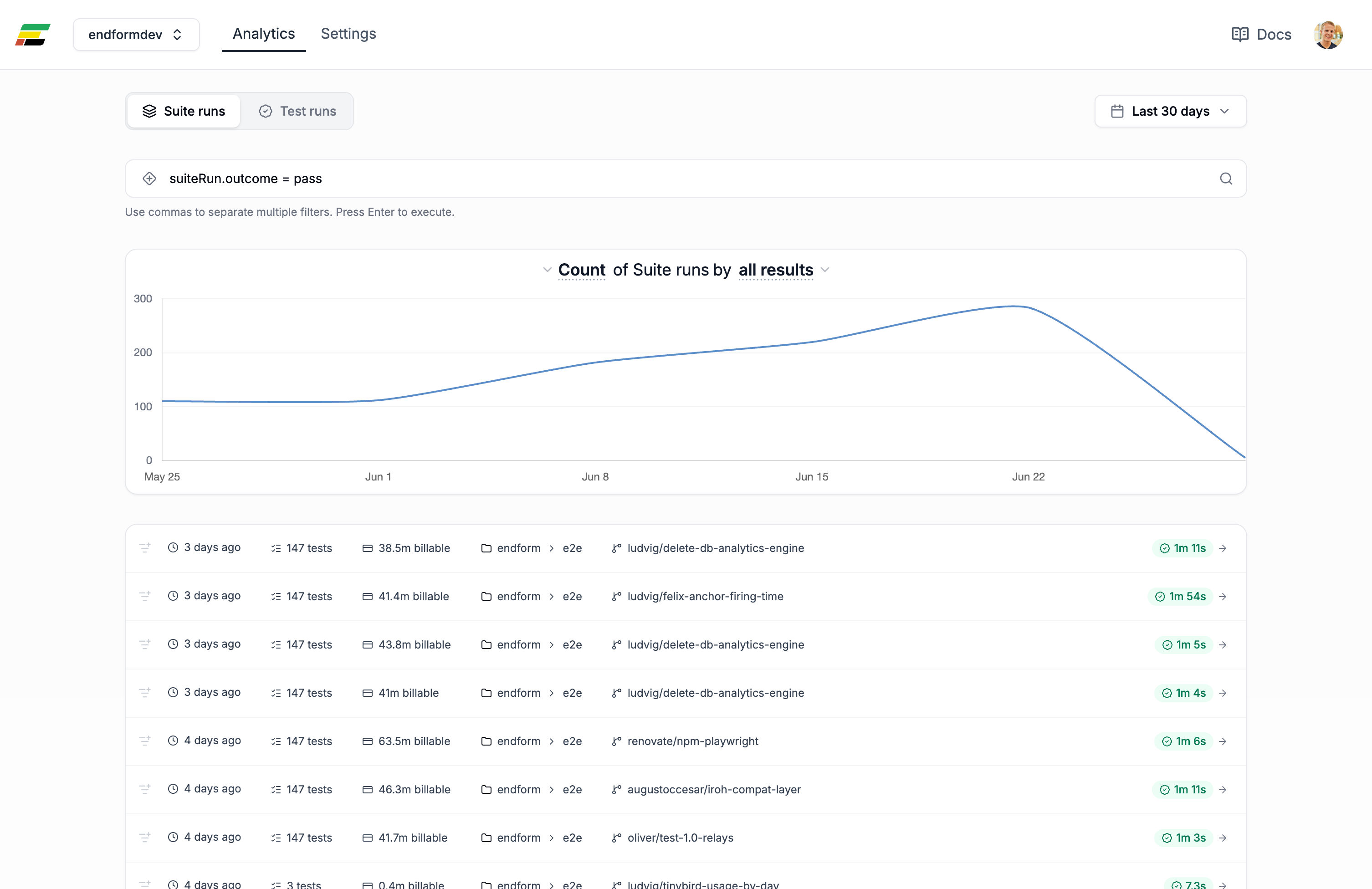
Your test results, traces, screenshots, and execution history are available immediately after a run completes. Historical runs are also linked together for cross-run analysis. This allows you to track test stability, investigate recurring failures, and identify patterns that would otherwise be spread across CI logs and artifacts.
The key benefits of using Endform include:
-
Deep cross-run analytics and historical failure trends
-
A unified view of test health across builds and environments
-
Centralized reporting designed for long-term test observability
-
Dashboard-driven workflows for debugging and investigation
-
Detection and analysis of flaky tests
-
Rich historical context that connects execution data, artifacts, and quality signals over time
If you’re migrating from Azure Playwright Testing, Endform directly addresses the common gaps you encounter after moving to Workspaces. It runs existing Playwright projects without modification, so you don’t need to rewrite tests or change frameworks to get started.
2. Standalone reporting layers like Allure
Another option teams often use is a standalone reporting layer, such as Allure. These tools ingest Playwright test results and generate dashboards for run history, failures, traces, and execution data.
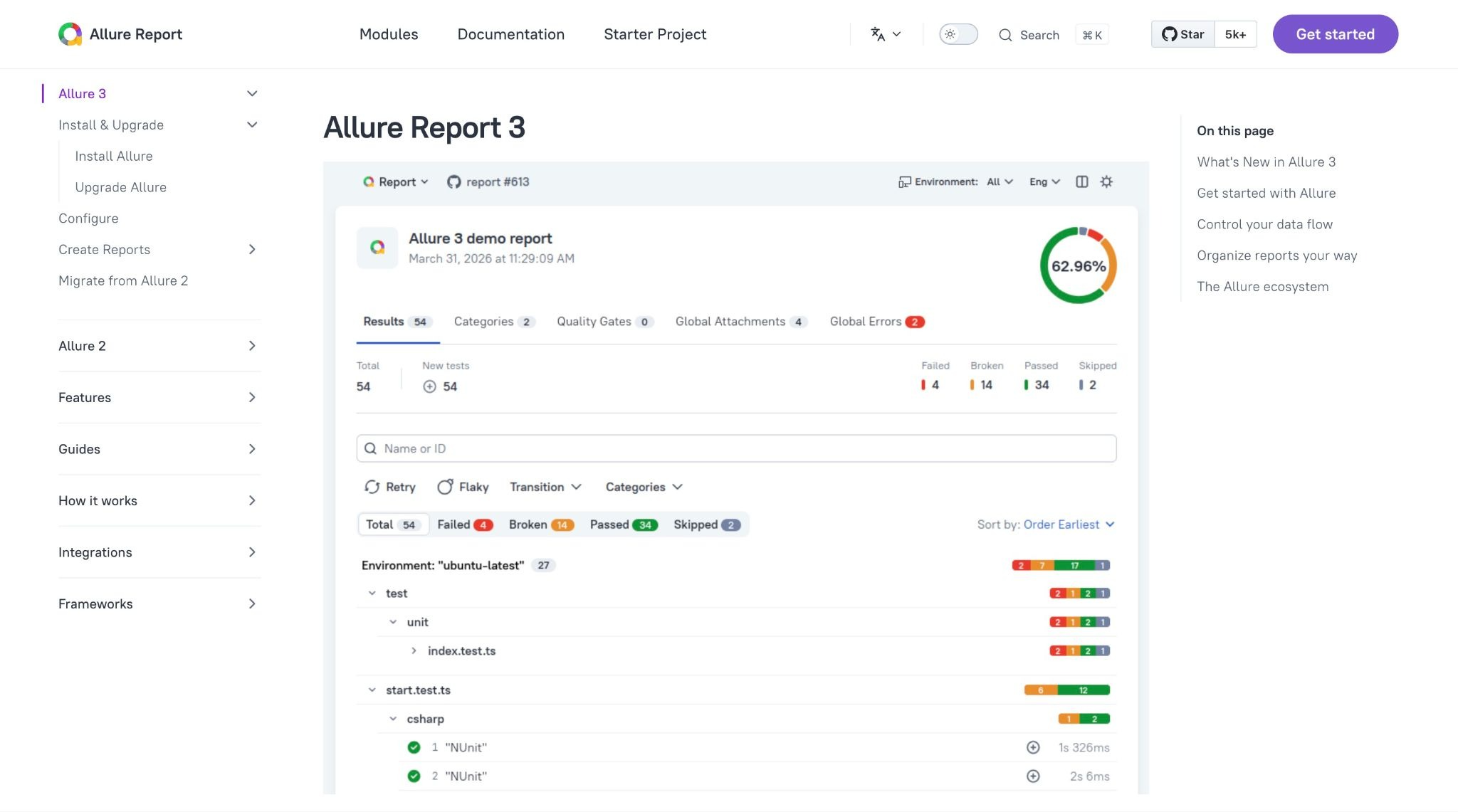
In this model, tests continue to run in GitHub Actions, Azure DevOps, or self-hosted infrastructure. The reporting layer sits on top of the existing workflow and provides a centralized view of results across runs. The main advantages of this approach are:
-
No changes to existing execution infrastructure
-
Centralized reporting and run history
-
Broad compatibility with Playwright and most CI systems
-
Lower migration effort compared to adopting a new execution platform
It’s also important to consider the tradeoffs:
-
Reporting remains separate from execution
-
CI, artifact storage, and reporting integrations must still be maintained
-
Test stability analysis is limited compared to integrated testing platforms
-
Operational complexity increases as projects, environments, and test volume grow
Tools like Allure work well when your test execution is already well-established and you mainly need better reporting. If you’re a smaller team, this can often be enough to restore much of the visibility you lose after moving away from Azure Playwright Testing.
But as your test volume grows, reporting alone often stops being enough. You start needing execution performance insights, test stability analysis, and cross-project visibility, which usually requires bringing in additional systems.
3. Self-hosted CI with Playwright sharding
The third option is to stay entirely within your existing CI systems, such as GitHub Actions or Azure Pipelines, and use Playwright’s native sharding and parallel execution features. In this setup, your test suite is split into multiple shards that run in parallel CI jobs, with each job executing a portion of the suite and reporting results back to the pipeline.
If your suite is small to mid-sized, this setup is often sufficient. You keep everything inside your current pipeline, avoid introducing new platforms, and rely on your CI system to orchestrate execution and store results. As your suite grows, however, complexity starts to increase. Sharding requires more careful tuning, CI usage grows with higher parallelization, and results become distributed across logs, artifacts, and pipeline runs unless you explicitly build a reporting layer on top.
To make the tradeoffs between these alternatives easier to compare, let’s look at where each one places responsibility for execution, reporting, and long-term test analysis.
Which option fits your team
Use the following table to decide which Playwright Workspace approach best fits your team.
| Execution model | Reporting & analytics | Cost model | Operational effort | Best fit | |
|---|---|---|---|---|---|
| Endform | Managed Playwright execution | Built-in test reporting and cross-run analysis | Usage-based | Low | Teams scaling test suites or needing end-to-end test visibility |
| Allure/reporting layer | Existing CI | External reporting dashboard over CI artifacts | Free (open source) + CI cost | Medium | Teams that want reporting without changing execution |
| Self-hosted CI | GitHub Actions / Azure Pipelines | Manual or custom reporting via artifacts | CI usage | Medium to high | Small suites with strong CI ownership |
In practice, CI-based setups are best when you want to keep everything in your pipeline, reporting layers like Allure work when you mainly need better visibility, and platforms like Endform are a better fit when you want execution, reporting, and historical analysis in a single system.
Why teams are choosing Endform
Endform is built for Playwright and restores the capabilities that Playwright Workspaces dropped. Your tests run on managed cloud infrastructure, with each test parallelized on its own machine, so your suite time is driven by your slowest test instead of the total runtime. Pricing is usage-based, so you pay only for the test minutes you use. Faster suites cost less. You’ll also get historical test data, flaky-test detection, and failure trends in one place instead of digging through CI logs and artifacts.
The Lovable case study shows what this looks like at scale. After moving their Playwright suite to Endform, Lovable cut execution time by 80% and now runs more than 400,000 tests per week while growing test coverage 10x. Their end-to-end runtime dropped immediately after migrating, and faster feedback made it easier to expand coverage.
You don’t need to rewrite your tests or rethink your Playwright setup. Endform runs your existing Playwright tests with support for global setup, projects, and custom dependencies. Migration is as simple as a package install, a config update, and replacing one CLI command.
Where to go from here
You migrated to Workspaces once because you had no other option. Now you do. Workspaces solved Microsoft’s infrastructure problem, not your team’s testing problem. The options above are designed to address that.
Whichever option you choose, your existing Playwright tests stay the same. With Endform, migration is as simple as replacing one CLI command and running your suite. See the Endform docs to get started.