Run and configure Endform: use the Endform CLI with your existing Playwright setup and configure remote test execution
# Getting started
> Running your tests with Endform for the first time
The easiest way to get started with Endform is to run the [Endform CLI](https://www.npmjs.com/package/endform) from your Playwright project directory.
```sh
npx endform@latest test
```
Deploying on Netlify? The [Netlify integration](/docs/guides/netlify-integration) runs your tests against every Deploy Preview, without a CI workflow.
## More ways to run your tests with Endform
## 1. Set up your project
Navigate to your Playwright project root:
```bash
cd your-project
```
## 2. Log in to Endform
Authenticate with the Endform CLI:
```bash
npx endform@latest login
```
## 3. Configure Playwright
Configure your `playwright.config.ts` to point to your remote server:
playwright.config.ts
```typescript
import { defineConfig } from '@playwright/test';
export default defineConfig({
use: {
baseURL: process.env.BASE_URL || 'https://staging.yourapp.com',
},
});
```
## 4. Run your tests
Execute your test suite with Endform:
```bash
npx endform@latest test
```
## View your results
Once your tests complete, results will appear in the [Endform dashboard](https://endform.dev/app).
# Custom Playwright reporters
> Using custom Playwright reporters with Endform
## Custom Playwright reporters in Endform
Endform fully supports Playwright’s custom reporter functionality. You can use all standard Playwright reporter configurations and methods to create custom reports for your test runs.
Custom reporters follow the Playwright reporter interface:
```typescript
import type {
FullConfig,
FullResult,
Reporter,
Suite,
TestCase,
TestResult,
} from "@playwright/test/reporter";
class MyCustomReporter implements Reporter {
onBegin(config: FullConfig, suite: Suite) {
console.log("Endform Report URL:", config.metadata.endformReportURL);
console.log(`Running ${suite.allTests().length} tests`);
}
onTestBegin(test: TestCase) {
console.log(`Starting test: ${test.title}`);
}
onTestEnd(test: TestCase, result: TestResult) {
console.log(`Finished test: ${test.title}`);
const endformTraceUrl = result.annotations.find(
(annotation) => annotation.type === "endformTestAttemptTraceURL",
)?.description;
if (endformTraceUrl) {
console.log(`Endform trace URL: ${endformTraceUrl}`);
}
const endformOtelTraceUrl = result.annotations.find(
(annotation) => annotation.type === "endformTestAttemptOtelTraceURL",
)?.description;
if (endformOtelTraceUrl) {
console.log(`Endform OpenTelemetry trace URL: ${endformOtelTraceUrl}`);
}
}
onEnd(result: FullResult) {
console.log(`Test suite finished with status: ${result.status}`);
}
}
export default MyCustomReporter;
```
For more details on creating custom reporters, see the [Playwright documentation on custom reporters](https://playwright.dev/docs/test-reporters#custom-reporters).
## When custom reporters run
In Endform, custom reporters run **after all tests have completed**, not while they are running live on remote runners. This approach models Playwright’s sharded test execution.
Endform runs each of your tests on a remote runner, which creates a blob report that is sent back to the original runner. Once all tests complete, the Playwright `merge-reports` CLI command runs, which is when your custom reporters will run.
For more information on Playwright’s sharding and how test reports are merged, see the [Playwright documentation on sharded runs](https://playwright.dev/docs/test-sharding).
## Endform-specific properties in custom reporters
Endform extends Playwright’s reporter interface with additional properties to enhance your reporting experience.
### Endform report URL
In the `onBegin` hook, Endform provides an `endformReportURL` in the `config.metadata` parameter that links directly to your test run in the Endform dashboard:
```javascript
onBegin(config: FullConfig, suite: Suite) {
// Access the Endform dashboard URL for this test run
console.log("Endform Report URL:", config.metadata.endformReportURL);
// Example output: https://endform.dev/app/org//suite-run?suite_run_id=
}
```
You can use this URL in your custom reporting to provide direct links to the suite run results in the Endform dashboard.
### Endform test attempt URL
In the `onTestEnd` hook, Endform adds an annotation with the type `endformTestAttemptTraceURL` that contains a link to the specific test attempt trace if one was created:
```javascript
onTestEnd(test: TestCase, result: TestResult) {
// Access the Endform trace URL for this specific test attempt
const endformTraceUrl = result.annotations.find(
(annotation) => annotation.type === "endformTestAttemptTraceURL",
)?.description;
if (endformTraceUrl) {
console.log(`Endform trace URL: ${endformTraceUrl}`);
// Example output: https://endform.dev/app/org/xyz...
}
}
```
You can use this URL in your custom reporting to link directly to the detailed trace information for each test attempt.
### Endform OpenTelemetry trace URL
When a Playwright OpenTelemetry trace was created for a test attempt, Endform also adds an annotation with the type `endformTestAttemptOtelTraceURL`. Endform detects this from the `playwrightOpentelemetryTraceId` annotation added by `playwright-opentelemetry/reporter`:
```javascript
onTestEnd(test: TestCase, result: TestResult) {
const endformOtelTraceUrl = result.annotations.find(
(annotation) => annotation.type === "endformTestAttemptOtelTraceURL",
)?.description;
if (endformOtelTraceUrl) {
console.log(`Endform OpenTelemetry trace URL: ${endformOtelTraceUrl}`);
// Example output: https://endform.dev/app/org/xyz...
}
}
```
This annotation is only present when the remote runner produced a Playwright OpenTelemetry trace for that test attempt.
## Quarantined results
[Quarantine rules](/docs/guides/quarantine-tests) allow selected tests to keep running without their failures normally failing the suite. Endform’s dashboard and analytics preserve the actual outcomes. The merged blob reports consumed by Playwright reporters use a passing representation for quarantined attempts whose original status is `passed`, `failed`, or `timedOut`.
For those attempts, the reported status and expected status are `passed`, and the reported errors are cleared. This means an HTML, JUnit, or custom reporter can show a passing result where Endform’s dashboard shows a quarantined failure. Skipped, interrupted, and attempts that did not run are not converted to passing results by quarantine.
The original information is available in two places:
* An `endform-quarantined` annotation identifies the quarantine rule and original status.
* An `application/json` attachment named `endform-quarantined-original-result` contains `quarantineRuleId`, `status`, `expectedStatus`, `errors`, and `annotations` from the original attempt.
If your reporter needs the original outcome, read the attachment rather than relying only on `result.status`. Attachments can be supplied as an inline body or a file path:
```typescript
import { readFileSync } from "node:fs";
import type { Reporter, TestCase, TestResult } from "@playwright/test/reporter";
export default class QuarantineReporter implements Reporter {
onTestEnd(test: TestCase, result: TestResult) {
const attachment = result.attachments.find(
(item) => item.name === "endform-quarantined-original-result",
);
if (!attachment) return;
const body =
attachment.body ??
(attachment.path ? readFileSync(attachment.path) : null);
if (!body) return;
const original = JSON.parse(body.toString("utf8"));
console.log(`${test.title}: ${original.status} (quarantined)`);
console.log("Quarantine rule:", original.quarantineRuleId);
}
}
```
Endform’s built-in terminal reporter reads these diagnostics to display original outcomes with quarantine labels and counts. Using the original failure to fail a separate reporting check can make that check fail even when Endform considers the suite passing.
# Transfer state to remote runners
> How to handle environment variable and file state transfer to Endform runners
Let’s briefly review Endform’s architecture.
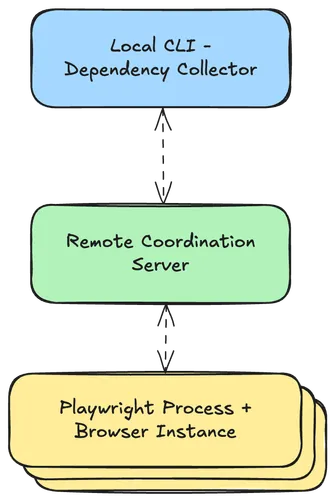
When you use Endform to run your tests, they are packaged, uploaded, and scheduled on many remote machines in the cloud.
This means that each test running on a remote machine might not have access to things that you have on your local machine, such as environment variables or files.
Your tests may depend on things like:
* An environment variable that declares the URL of your preview environment
* A file that contains authentication credentials or cookies (`storageState` in your Playwright config)
* An image in your file system that is used as a screenshot reference
Endform will try to detect and transfer many commonly used pieces of state to the remote runners automatically. You may need to do some additional configuration to transfer more state, depending on your setup.
If you want to understand exactly which state Endform will transfer to the remote runners, you can use the `--debug` flag to show the files and environment variables that are transferred: `endform test --debug`.
## Automatically transferred state
Endform can detect and transfer the following pieces of state automatically:
* **JS/TS files and dependencies** - all JS/TS files that are needed for your tests to run, including `package.json` files, `tsconfig.json` files, and `node_modules` dependencies
* **Your Playwright config** - [for more information on supported options, see the requirements](/docs/reference/requirements#playwright-configuration-options)
* **`storageState`** - any files that are listed in the `storageState` option of your Playwright config
## Partially transferred state
### Environment variables
Environment variables are often highly sensitive in nature.
In order for Endform to reduce its exposure to sensitive data, only some environment variables are automatically transferred to the remote runners.
* `E2E_*` - any environment variables that start with `E2E_` are transferred
* Environment variables that are used / referenced from your tests via `process.env` are picked up.
The *values* of the environment variables are taken while running your `playwright.config.ts`, so using a package like [dotenv](https://www.npmjs.com/package/dotenv) in your Playwright config is supported.
Environment variables that `globalSetup` sets do not reach the remote runners, even `E2E_*` ones, because it runs after the values are taken. Set them in your `playwright.config.ts` instead.
## Additional configuration
Endform has two additional ways of transferring state to the remote runners:
* **Environment Variables** - `environmentVariables` in your Endform config
* **Files** - `additionalFiles` in your Endform config
For more information on these options, see the [Endform config reference](/docs/reference/endform-config-ts).
## Transferring network traffic from the remote runners
To find out more about how to direct traffic from the remote runners to your local network, see the [proxy traffic via your local network](/docs/guides/proxy-via-local) guide.
# WebKit Browser Support (Experimental)
> Limitations and recommendations for using WebKit browser testing on Endform
Endform now offers experimental WebKit browser support for testing in AWS Linux. This allows you to test your application with Safari-like behavior on our infrastructure.
## What to Expect
### Tests That Typically Work Well
* Basic page navigation and form interactions
* DOM manipulation and JavaScript execution
* Standard web application flows (login, CRUD operations)
* CSS and layout testing (with some caveats)
* Cross-browser compatibility validation
### Tests That May Have Issues
* Performance-sensitive tests - WebKit runs significantly slower than Chromium/Firefox
* Media-heavy pages - Video and audio playback may not work reliably
* Complex single-page applications - May experience stability issues
* Visual regression tests - Font rendering differs from macOS Safari
* Sites with proprietary codecs - Limited media format support on Linux
### Tests That Likely Won’t Work
* Real-time video/audio testing - Codec limitations on Linux
* WebGL/advanced graphics - Software rendering only, no GPU acceleration
* Browser extension testing - Not supported in Playwright’s WebKit
## Known Limitations
### Performance
WebKit on Linux is **significantly slower** than other browsers in our environment:
* Simple interactions: 2-5x slower than Chromium
* Complex pages: May take 30-60+ seconds to load
* Test suites: Expect 3-10x longer execution times
This performance difference is a known limitation of WebKit on Linux, documented in upstream issues like [Playwright #31481](https://github.com/microsoft/playwright/issues/31481) and [Playwright #18119](https://github.com/microsoft/playwright/issues/18119), where users report WebKit tests taking 2-3x longer than Chromium/Firefox, with some operations taking 40+ seconds more.
**Recommendation**: Increase timeouts for WebKit tests (90-120 seconds per test minimum).
### Compatibility Differences
WebKit on Linux does not perfectly match Safari on macOS:
* Different font rendering (affects screenshots)
* Limited media codec support
* Some CSS properties may render differently
* JavaScript performance characteristics differ
### Platform-Specific Limitations
As noted in [Playwright’s official documentation](https://playwright.dev/docs/browsers#webkit):
> “availability of certain features, which depend heavily on the underlying platform, may vary between operating systems. For example, available media codecs vary substantially between Linux, macOS and Windows.”
This means:
* Media playback: Video and audio codecs are limited on Linux compared to macOS
* Codec support: Proprietary media formats may not work on Linux WebKit
## Recommendations
### For Most Clients
Start with Chromium and Firefox for your primary test coverage. Add WebKit for:
* Cross-browser validation of critical user journeys
* Catching Safari-specific layout issues early
* Experimental coverage of edge cases
### Configuration Tips
#### Playwright Configuration
```typescript
{
projects: [
{
name: "webkit",
timeout: 120000, // 2 minutes per test
fullyParallel: false, // Run sequentially
retries: 1, // Allow one retry for flaky tests
},
];
}
```
#### Test Writing
* Avoid tight timings: Use generous wait times
* Skip visual tests: Screenshot comparisons may be unreliable
* Simplify selectors: Complex CSS may be slower
* Test critical paths first: Start with your most important user flows
### When to Use WebKit
| Scenario | Recommendation |
| ------------------------ | ----------------------------- |
| Primary test suite | Not recommended (too slow) |
| Cross-browser validation | Good for critical paths |
| Safari compatibility | Best available option |
| Performance testing | Use Chromium instead |
| Visual regression | Expect differences from macOS |
| Production monitoring | Not recommended (stability) |
## Support Scope
This is **experimental** support with the following limitations:
Supported:
* Basic WebKit testing on Linux (ARM64)
Not Supported:
* WebKit on other architectures
* Branded Safari browser (Playwright uses its own WebKit build, not Apple Safari)
* GPU-accelerated rendering
* Video/audio playback testing
* Production synthetic monitoring
## References
* [Playwright WebKit Documentation](https://playwright.dev/docs/browsers#webkit) - Official WebKit browser support details
* [Playwright Browser Configuration](https://playwright.dev/docs/browsers) - Complete browser setup guide
***
*WebKit support is experimental and provided on a best-effort basis. Endform may modify or discontinue this feature without notice.*
# Proxy traffic via your local network
> How to proxy traffic from your remote runners to your local network. This helps you run tests against local servers
Servers that you want to test against that are either running locally or within a private network are not automatically exposed to the internet. These servers are not reachable by default from the remotely running Playwright instances. Trying to reach them without this extra setup would likely result in connection errors in your tests.
When this happens, we need a method of shuttling traffic between the remote runners and the servers running on your local network.
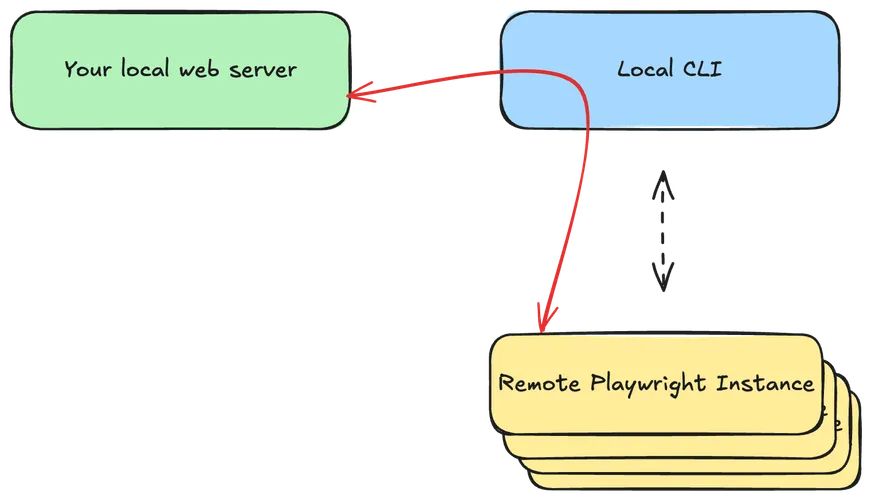
Endform has the ability to connect the remote Playwright runners to the servers on your local network via direct, hole-punched, encrypted, peer-to-peer connections. We can do this by utilizing the [iroh network](https://www.iroh.computer/docs/overview).
## Setting up Endform to proxy traffic
1. ### Configure which traffic to proxy.
#### As a Playwright `webServer`
If you want to run your local server as a [Playwright `webServer`](https://playwright.dev/docs/api/class-testconfig#test-config-web-server) then you’re done! Leave your web server configuration as is, and we will automatically proxy the traffic to your local server.
#### With your own custom server
If you’re running a server outside of Playwright, that’s fine. You can tell Endform which traffic to proxy by using an `endform.config.ts` file.
Use `proxyNetworkHosts` for most local web servers and APIs. This is the easiest option and uses HTTP interception in Node and in the browser.
endform.config.ts
```plaintext
import { defineEndformConfig } from "endform";
export default defineEndformConfig({
proxyNetworkHosts: ["", "*.my-special-domain.com"],
});
```
If you need raw TCP connections to a local loopback port, use `proxyNetworkPorts` instead. Useful for things like database connections.
endform.config.ts
```plaintext
import { defineEndformConfig } from "endform";
export default defineEndformConfig({
proxyNetworkPorts: [5432, 6379],
});
```
You can configure both at the same time if needed. You can read more about `proxyNetworkHosts` and `proxyNetworkPorts` in the [endform config reference](/docs/reference/endform-config-ts#proxynetworkhosts).
2. ### Run your tests!
That’s it! You can now run your tests as normal, and the traffic will be proxied via the CLI to your target server.
# Performance tuning your Playwright suite for Endform
> Tune Endform concurrency, network proxying, and runner regions for faster Playwright runs
Endform works best when your Playwright tests can run independently and in parallel.
But just because your suite can’t run with full parallelism today doesn’t mean that you can’t still benefit from using Endform as your runner.
Here is some advice on achieving the maximum possible performance of your suite regardless of your underlying system constraints.
## Limit concurrency around bottlenecks
Endform can run hundreds of tests in parallel. This lets us run suites extremely quickly, but it also means your application, databases, APIs, payment sandboxes, and third-party services may receive more parallel traffic than they do in a local Playwright run.
`concurrentTestLimits` lets you run as many parallel tests as you can based on the specific constraints of your underlying systems.
The full reference of `concurrentTestLimits` [can be found here](/docs/reference/endform-config-ts#concurrenttestlimits).
### Examples:
Limit the whole suite run when the application under test has a broad capacity limit (like a resource-constrained local server):
```ts
export default defineEndformConfig({
concurrentTestLimits: [{ scope: "within-suite-run", limit: 40 }],
});
```
Use a tag-specific limit when only some tests hit a constrained dependency:
```ts
export default defineEndformConfig({
concurrentTestLimits: [{ scope: "within-suite-run", label: "tag:@checkout", limit: 3 }],
});
```
Use a project-specific limit when one Playwright project is slower or more expensive than the others:
```ts
export default defineEndformConfig({
concurrentTestLimits: [{ scope: "within-suite-run", label: "project:mobile-chrome", limit: 8 }],
});
```
Use `across-all-runs` when the bottleneck is shared by multiple suite runs in your organization, such as parallel CI jobs running against the same staging environment:
```ts
export default defineEndformConfig({
concurrentTestLimits: [{ scope: "across-all-runs", label: "tag:@writes-to-staging", limit: 40 }],
});
```
All matching limits apply at the same time. If a test matches a suite-wide limit and a tag-specific limit, it must fit within both.
Prefer the smallest useful scope. For example, limiting `tag:@checkout` to 3 usually preserves more parallelism than limiting the whole suite to 3.
## Choose the closest runner region
Endform runs remote tests in the region closest to the request by default. Requests from North America and South America default to US runners. Other requests default to EU runners.
Set `region` when the default is not close to the application under test:
```ts
export default defineEndformConfig({
region: "us",
});
```
Available values are `"us"` and `"eu"`.
Choose the region based on where browser traffic goes during the test. If your CI job runs in the US but your preview/staging environment and database are in Europe, `"eu"` may be faster. If your app is hosted in the US but you run the CLI from Europe, `"us"` may be faster.
If you proxy local traffic, region tuning may have less effect because proxied requests still pass through the CLI machine. In that case, the best region is often the one that minimizes the runner-to-CLI path, but the fastest long-term setup is usually to run against a publicly reachable preview environment close to the runners.
## Example configuration
This example tunes a suite that runs against a US-hosted preview environment, protects checkout tests from overwhelming a payment sandbox, limits total staging writes across parallel CI jobs, and proxies a single internal API:
```ts
import { defineEndformConfig } from "endform";
export default defineEndformConfig({
region: "us",
concurrentTestLimits: [
{ scope: "within-suite-run", limit: 50 },
{ scope: "within-suite-run", label: "tag:@checkout", limit: 3 },
{ scope: "across-all-runs", label: "tag:@writes-to-staging", limit: 10 },
],
});
```
Start with the limit or network setting that maps to the bottleneck you actually see. The goal is to keep parallelism high while removing the specific constraint that makes a run slow or unstable.
# Endform config - endform.jsonc
> Configure Endform further with an `endform.jsonc` file
Caution
[`endform.config.ts`](/docs/reference/endform-config-ts) is our new type of configuration file, and `endform.jsonc` will be deprecated at some point in the future. We recommend using [`endform.config.ts` or `endform.config.js`](/docs/reference/endform-config-ts) for new projects.
To migrate an existing `endform.jsonc` or `endform.json` file, run:
```bash
npx endform@latest migrate-config
```
To further configure Endform, place an `endform.jsonc` file in your repository. It can be:
* In the same folder as your Playwright suite -> applies to that suite
* In the root of your repository -> applies to all suites in your repository
## `endform.jsonc` config parameters
Currently, `endform.jsonc` supports the following options:
### `additionalFiles`
`additionalFiles`: an array of strings used as globs to send extra files to your test machines.
```json
{
"additionalFiles": ["user-state/*"]
}
```
If your Playwright config already specifies `storageState`, this parameter should not be needed - Endform will read and send those automatically. However if your tests have implicit dependencies on more files, use this parameter.
### `concurrentTestLimits`
Set concurrency limits for a suite run. Each item has a `scope`, optional `label`, and `limit`.
Two scopes are supported:
* `"within-suite-run"` for limiting concurrent tests in that test suite run
* `"across-all-runs"` for limiting concurrent tests across all matching test suites that your organization is running - a shared, global limit
For `label`:
* use `tag:@my-tag` to limit by [test tag](https://playwright.dev/docs/test-annotations#tag-tests)
* use `project:project-name` to limit runs of tests within a project
* if not set / `null`, the limit applies to all tests in the run
Then set `limit` for the maximum number of allowed concurrent tests to run within that group.
```json
{
"concurrentTestLimits": [
{ "scope": "within-suite-run", "limit": 20 },
{ "scope": "within-suite-run", "label": "tag:@smoke", "limit": 2 },
{ "scope": "across-all-runs", "label": "project:slow-backend", "limit": 10 }
]
}
```
Running tests must satisfy all applicable limits. In this example:
* Within the suite run, 20 tests can run concurrently, with at most 2 tagged `@smoke` tests running
* No more than 10 tests in the `slow-backend` project can run at the same time, across all currently running test suites in your organization
### `environmentVariables`
`environmentVariables`: an array of string regular expressions that are used to match environment variables that should be transferred to the remote runners.
```json
{
"environmentVariables": ["VERCEL_.*"]
}
```
By default the following environment variables are automatically transferred:
* Environment variables that start with `E2E_`
* All environment variables that are set in your `playwright.config.ts`
#### Excluding environment variables
Prefix a pattern with `!` to exclude matching environment variables, including ones that would be transferred automatically:
```json
{
"environmentVariables": ["!^PLAYWRIGHT_BDD_CONFIGS$"]
}
```
### `extraHttpHeaders`
Set extra HTTP headers that will be applied to the Playwright browser contexts when tests run on remote runners. The value is a JSON object mapping header names to string values.
```json
{
"extraHttpHeaders": {
"x-custom-auth": "my-secret-token",
"x-bypass-protection": "token-value"
}
}
```
These headers are merged into Playwright’s `extraHTTPHeaders` option on both the top-level `use` and each project’s `use`. Headers defined in your `playwright.config.ts` take precedence — if the same header name exists in both your Playwright config and `endform.jsonc`, the value from your Playwright config wins.
#### Environment variable override
You can override `extraHttpHeaders` using the `ENDFORM_EXTRA_HTTP_HEADERS` environment variable. Set it to a JSON string of key-value pairs:
```bash
ENDFORM_EXTRA_HTTP_HEADERS='{"x-custom-auth":"env-token"}' npx endform test
```
When this environment variable is set, it **fully replaces** the `extraHttpHeaders` defined in `endform.jsonc` (the two are not merged together).
### `organizationId`
Specify which organization ID this project should run within. This is the highest-precedence configuration for organization ID when running suites. Suite runs fail if the authenticated user does not have access to that organization.
### `proxyNetworkHosts`
Choose which host names will have their HTTP traffic redirected to the CLI from the remote runners. This is the easiest option for local web apps and APIs, and uses HTTP interception in Node and in the browser. All the traffic sent from the remote runners to your CLI is sent encrypted over direct peer-to-peer connections. Read more about [traffic to local servers here](/docs/guides/proxy-via-local).
```json
{
"proxyNetworkHosts": ["*.test.internal-domain", "*.staging.internal-domain", ""]
}
```
Each string in the array is a match rule. Either:
* A hostname pattern `my-domain.com`, `*.internal.org`
* An IP literal like `127.0.0.1`
* `` to match interfaces `localhost`, `*.localhost`, `127.0.0.1`, `[::1]`
### `proxyNetworkPorts`
Choose which local loopback ports will accept raw TCP connections from the remote runners. Use this for databases or other clients that need to connect directly to `127.0.0.1:`. All the traffic sent from the remote runners to your CLI is sent encrypted over direct peer-to-peer connections. Read more about [traffic to local servers here](/docs/guides/proxy-via-local).
```json
{
"proxyNetworkPorts": [5432, 6379]
}
```
### `region`
By default, your tests are run in the closest available region to where the Endform CLI was run.
To override this choice, for example if your test environment is in a different region from your CI jobs, add the region parameter to your `endform.jsonc`.
Available values are `"eu"` and `"us"`.
```json
{
"region": "eu"
}
```
# Endform config - endform.config.ts
> Configure Endform further with an `endform.config.ts` or `endform.config.js` file
To further configure Endform, place an `endform.config.ts` (or `endform.config.js`) file in your repository. It can be:
* In the same folder as your Playwright suite -> applies to that suite
* In the root of your repository -> applies to all suites in your repository
If you already have an `endform.jsonc` or `endform.json` file, migrate it with:
```bash
npx endform@latest migrate-config
```
## `endform.config.ts` config parameters
Currently, `endform.config.ts` supports the following options:
### `additionalFiles`
`additionalFiles`: an array of strings used as globs to send extra files to your test machines.
```ts
import { defineEndformConfig } from "endform";
export default defineEndformConfig({
additionalFiles: ["user-state/*"],
});
```
If your Playwright config already specifies `storageState`, this parameter should not be needed - Endform will read and send those automatically. However if your tests have implicit dependencies on more files, use this parameter.
### `concurrentTestLimits`
Set concurrency limits for a suite run. Each item has a `scope`, optional `label`, and `limit`.
Two scopes are supported:
* `"within-suite-run"` for limiting concurrent tests in that test suite run
* `"across-all-runs"` for limiting concurrent tests across all matching test suites that your organization is running - a shared, global limit
For `label`:
* use `tag:@my-tag` to limit by [test tag](https://playwright.dev/docs/test-annotations#tag-tests)
* use `project:project-name` to limit runs of tests within a project
* use `lock:lock-name` to limit tests that use a Playwright lock, set with `{ lock: 'lock-name' }` - see [locks](#locks)
* if not set, the limit applies to all tests in the run
A label must start with `tag:`, `project:` or `lock:`.
Then set `limit` for the maximum number of allowed concurrent tests to run within that group. `limit` must be greater than 0.
```ts
import { defineEndformConfig } from "endform";
export default defineEndformConfig({
concurrentTestLimits: [
{ scope: "within-suite-run", limit: 20 },
{ scope: "within-suite-run", label: "tag:@smoke", limit: 2 },
{ scope: "across-all-runs", label: "project:slow-backend", limit: 10 },
{ scope: "across-all-runs", label: "lock:shared-account", limit: 1 },
],
});
```
Running tests must satisfy all applicable limits. In this example:
* Within the suite run, 20 tests can run concurrently, with at most 2 tagged `@smoke` tests running
* No more than 10 tests in the `slow-backend` project can run at the same time, across all currently running test suites in your organization
* Only one test that uses the `shared-account` lock can run at a time, across all currently running test suites in your organization
#### Locks
Playwright gives every lock a default limit of 1, and Endform applies it within a suite run. Tests that share a lock never run at the same time in one suite run, without any config.
Add a `lock:` entry to change that limit, to make it `"across-all-runs"` so it applies across your whole organization, or both. For example:
* `limit: 1` with `"across-all-runs"` keeps a lock exclusive across CI jobs, so two suite runs never use the same shared resource at once
* `limit: 10` protects the performance of a constrained environment, such as a small staging server that slows down when too many tests use it at once
### `environmentVariables`
`environmentVariables`: an array of string regular expressions that are used to match environment variables that should be transferred to the remote runners.
```ts
import { defineEndformConfig } from "endform";
export default defineEndformConfig({
environmentVariables: ["VERCEL_.*"],
});
```
By default the following environment variables are automatically transferred:
* Environment variables that start with `E2E_`
* All environment variables that are set in your `playwright.config.ts`
#### Excluding environment variables
Prefix a pattern with `!` to exclude matching environment variables, including ones that would be transferred automatically:
```ts
import { defineEndformConfig } from "endform";
export default defineEndformConfig({
environmentVariables: ["!^PLAYWRIGHT_BDD_CONFIGS$"],
});
```
### `extraHttpHeaders`
Set extra HTTP headers that will be applied to the Playwright browser contexts when tests run on remote runners. The value is an object mapping header names to string values.
```ts
import { defineEndformConfig } from "endform";
export default defineEndformConfig({
extraHttpHeaders: {
"x-custom-auth": "my-secret-token",
"x-bypass-protection": "token-value",
},
});
```
These headers are merged into Playwright’s `extraHTTPHeaders` option on both the top-level `use` and each project’s `use`. Headers defined in your `playwright.config.ts` take precedence — if the same header name exists in both your Playwright config and `endform.config.ts`, the value from your Playwright config wins.
#### Environment variable override
You can override `extraHttpHeaders` using the `ENDFORM_EXTRA_HTTP_HEADERS` environment variable. Set it to a JSON string of key-value pairs:
```bash
ENDFORM_EXTRA_HTTP_HEADERS='{"x-custom-auth":"env-token"}' npx endform test
```
When this environment variable is set, it **fully replaces** the `extraHttpHeaders` defined in `endform.config.ts` (the two are not merged together).
### `organizationId`
Specify which organization ID this project should run within. This is the highest-precedence configuration for organization ID when running suites. Suite runs fail if the authenticated user does not have access to that organization.
```ts
import { defineEndformConfig } from "endform";
export default defineEndformConfig({
organizationId: "my-organization-id",
});
```
### `otlpEndpoint`
Export Playwright OpenTelemetry traces from remote runners to an external OTLP/HTTP traces endpoint.
```ts
import { defineEndformConfig } from "endform";
export default defineEndformConfig({
otlpEndpoint: "https://api.eu1.honeycomb.io/v1/traces",
});
```
When `otlpEndpoint` is set, Endform configures [`playwright-opentelemetry`](https://github.com/endformdev/playwright-opentelemetry) on remote runners and enables trace header propagation for browser and application traffic.
### `otlpHeaders`
Set HTTP headers to send with external OTLP trace exports from remote runners. Use this for provider authentication or other vendor-specific headers.
```ts
import { defineEndformConfig } from "endform";
export default defineEndformConfig({
otlpEndpoint: "https://api.eu1.honeycomb.io/v1/traces",
otlpHeaders: {
"x-honeycomb-team": process.env.HONEYCOMB_API_KEY!,
},
});
```
### `proxyNetworkHosts`
Choose which host names will have their HTTP traffic redirected to the CLI from the remote runners. This is the easiest option for local web apps and APIs, and uses HTTP interception in Node and in the browser. All the traffic sent from the remote runners to your CLI is sent encrypted over direct peer-to-peer connections. Read more about [traffic to local servers here](/docs/guides/proxy-via-local).
```ts
import { defineEndformConfig } from "endform";
export default defineEndformConfig({
proxyNetworkHosts: ["*.test.internal-domain", "*.staging.internal-domain", ""],
});
```
Each string in the array is a match rule. Either:
* A hostname pattern `my-domain.com`, `*.internal.org`
* An IP literal like `127.0.0.1`
* `` to match interfaces `localhost`, `*.localhost`, `127.0.0.1`, `[::1]`
### `proxyNetworkPorts`
Choose which local loopback ports will accept raw TCP connections from the remote runners. Use this for databases or other clients that need to connect directly to `127.0.0.1:`. All the traffic sent from the remote runners to your CLI is sent encrypted over direct peer-to-peer connections. Read more about [traffic to local servers here](/docs/guides/proxy-via-local).
```ts
import { defineEndformConfig } from "endform";
export default defineEndformConfig({
proxyNetworkPorts: [5432, 6379],
});
```
### `region`
By default, your tests are run in the closest available region to where the Endform CLI was run.
To override this choice, for example if your test environment is in a different region from your CI jobs, add the region parameter to your `endform.config.ts`.
Available values are `"eu"` and `"us"`.
```ts
import { defineEndformConfig } from "endform";
export default defineEndformConfig({
region: "eu",
});
```
# Environment variables
> Environment variables used by Endform and how to configure them
## User-defined environment variables
Endform transfers selected environment variables to remote runners. For details, see [`environmentVariables` in the Endform config](/docs/reference/endform-config-ts#environmentvariables).
At a high level:
* `E2E_*` variables are transferred automatically.
* `CI` is transferred automatically when it is set, so tests and tools on remote runners see the same value as the machine that started the run.
* Variables referenced from tests via `process.env` are transferred automatically.
* You can explicitly include additional variables with `environmentVariables`.
* You can exclude variables with `!`-prefixed patterns in `environmentVariables`, for example `"!^PLAYWRIGHT_BDD_CONFIGS$"`. Exclusions take precedence over everything above.
## Runtime marker: `ENDFORM=true`
Endform sets `ENDFORM=true` for Node processes it starts as part of your test execution flow.
You can use this to detect Endform runtime context in your own code:
```ts
const isEndform = process.env.ENDFORM === "true";
```
## Extra HTTP Headers
You can set `ENDFORM_EXTRA_HTTP_HEADERS` to override the Playwright `extraHttpHeaders` option. See [`extraHttpHeaders` in the Endform config](/docs/reference/endform-config-ts#extrahttpheaders).
## Git metadata overrides
`ENDFORM_GIT_BRANCH` and `ENDFORM_GIT_COMMIT_SHA` are a simple way to override the branch and commit that Endform reports for a run.
### `ENDFORM_GIT_BRANCH`
Explicitly sets the git branch name Endform should associate with a suite run.
### `ENDFORM_GIT_COMMIT_SHA`
Explicitly sets the git commit SHA Endform should associate with a suite run.
If set, Endform uses these values instead of automatic git detection.
# Requirements
> Our requirements on your Playwright setup
Endform is a *parallel*, *remote* test runner. Your Playwright tests will be run on many separate machines in the cloud.
### Parallel
We respect the [`fullyParallel` Playwright configuration option](https://playwright.dev/docs/api/class-testconfig#test-config-fully-parallel):
This means that:
* If `fullyParallel: false` (Playwright default), each *file* will run in parallel.
* If `fullyParallel: true`, each *test case* will run in parallel.
Generally, this means that your tests need to be *independent* of each other in order to not interfere with other tests running at the same time.
If you already keep your tests decoupled from your application by, for example, using APIs to generate data, you are probably ready to use Endform.
### Remote
Since your tests will be running on remote machines, the servers you are testing against need to be accessible to the remote runners. There are two ways to achieve this:
* You are running preview infrastructure or a testing environment that is exposed to the internet anyway.
* Endform can automatically shuttle traffic between the remote runners and the machine your CLI runs on. Check out the [guide on proxying traffic via your local network](/docs/guides/proxy-via-local) for more information about this approach.
## Playwright requirements
* We support Playwright projects written in TypeScript and JavaScript.
* The length of an individual test run is limited to 4 minutes (same as the `testConfig.timeout` option). The Playwright default timeout is 30 seconds. This does not include retries.
* If you are running `fullyParallel: false`, then the maximum timeout of 15 minutes applies to each *file*.
* We currently only support the latest three minor versions of Playwright.
* We support Chrome, Firefox, and experimental WebKit. We run the same browser versions as the Playwright version you are running ships with.
### Playwright configuration options
Endform tries to directly use or replicate all Playwright configuration options. To understand how most of these options work, please refer to the [Playwright documentation](https://playwright.dev/docs/test-configuration).
There are a few exceptions to this.
Options that we currently don’t support, but will do in future (let us know and we will prioritize them):
* `.only()`
* `.fail()`
## Node requirements
The Endform CLI is the [`endform` package on npm](https://www.npmjs.com/package/endform).
* A version of Node.js that is more recent than the latest LTS version (Node 22+).
* In the remote test environment, your tests will run on Node LTS.
## Browser requirements
* We support Chrome, Firefox, and experimental WebKit. We run the same browser versions as the Playwright version you are running ships with.
## Operating system requirements
* We currently support Linux, macOS, and Windows.